
Agentic Nets Building Blocks – The Complete Overview of Transition Types
Agentic Nets are executable Petri nets that combine traditional process modeling with intelligent automation. They transform static process diagrams into living systems that can route, transform, integrate, analyze, decide, and execute – all orchestrated through six fundamental building blocks.
Each building block is a transition type that defines how tokens flow through your agentic process. By composing these blocks, you create powerful automation pipelines that range from simple data routing to complex AI-driven decision systems.
The Six Building Blocks
Every Agentic Net is built from six transition types, each serving a distinct purpose:
| Transition | Purpose | Use When | Guide |
|---|---|---|---|
| PASS | Route tokens without modification | Conditional routing, fan-out, filtering | Complete Guide |
| MAP | Transform token structure | Restructure data, add computed fields | Complete Guide |
| HTTP | Call external REST APIs | Third-party integrations, webhooks | Complete Guide |
| LLM | AI-powered analysis | Summarization, classification, generation | Complete Guide |
| AGENT | Autonomous AI execution | Complex reasoning, multi-step tasks | Complete Guide |
| COMMAND | System shell execution | Bash commands, file operations, scripts | Complete Guide |
The Showcase: Document Processing Pipeline
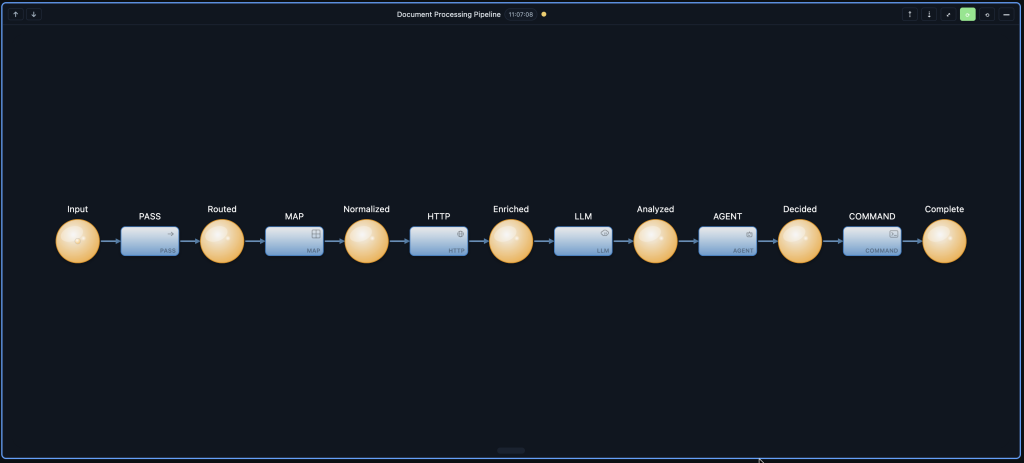
To see all six building blocks in action, consider an Intelligent Document Processing Pipeline. A document arrives, gets routed by type, normalized, enriched with external data, analyzed by AI, has decisions made by an agent, and finally triggers system actions:
What Happens at Each Step
- PASS – Routes the incoming document based on its type (email, report, ticket) without modifying the content
- MAP – Normalizes the document structure into a consistent format, extracting key fields
- HTTP – Fetches additional context from external APIs (user profile, permissions, related documents)
- LLM – Analyzes the content using AI to extract summary, sentiment, urgency, and key topics
- AGENT – Makes intelligent decisions about next steps based on the analysis (approve, escalate, archive)
- COMMAND – Executes system actions based on the decision (move file, send notification, update database)
PNML Definition
Here’s the complete PNML for this showcase agentic process:
{
  "net": {
    "places": {
      "p-input":      { "id": "p-input", "x": 50, "y": 200, "tokens": 1, "label": "Input" },
      "p-routed":     { "id": "p-routed", "x": 250, "y": 200, "tokens": 0, "label": "Routed" },
      "p-normalized": { "id": "p-normalized", "x": 450, "y": 200, "tokens": 0, "label": "Normalized" },
      "p-enriched":   { "id": "p-enriched", "x": 650, "y": 200, "tokens": 0, "label": "Enriched" },
      "p-analyzed":   { "id": "p-analyzed", "x": 850, "y": 200, "tokens": 0, "label": "Analyzed" },
      "p-decided":    { "id": "p-decided", "x": 1050, "y": 200, "tokens": 0, "label": "Decided" },
      "p-complete":   { "id": "p-complete", "x": 1250, "y": 200, "tokens": 0, "label": "Complete" }
    },
    "transitions": {
      "t-pass":    { "id": "t-pass", "x": 150, "y": 200, "label": "PASS" },
      "t-map":     { "id": "t-map", "x": 350, "y": 200, "label": "MAP" },
      "t-http":    { "id": "t-http", "x": 550, "y": 200, "label": "HTTP" },
      "t-llm":     { "id": "t-llm", "x": 750, "y": 200, "label": "LLM" },
      "t-agent":   { "id": "t-agent", "x": 950, "y": 200, "label": "AGENT" },
      "t-command": { "id": "t-command", "x": 1150, "y": 200, "label": "COMMAND" }
    },
    "arcs": {
      "a1":  { "id": "a1", "source": "p-input", "target": "t-pass" },
      "a2":  { "id": "a2", "source": "t-pass", "target": "p-routed" },
      "a3":  { "id": "a3", "source": "p-routed", "target": "t-map" },
      "a4":  { "id": "a4", "source": "t-map", "target": "p-normalized" },
      "a5":  { "id": "a5", "source": "p-normalized", "target": "t-http" },
      "a6":  { "id": "a6", "source": "t-http", "target": "p-enriched" },
      "a7":  { "id": "a7", "source": "p-enriched", "target": "t-llm" },
      "a8":  { "id": "a8", "source": "t-llm", "target": "p-analyzed" },
      "a9":  { "id": "a9", "source": "p-analyzed", "target": "t-agent" },
      "a10": { "id": "a10", "source": "t-agent", "target": "p-decided" },
      "a11": { "id": "a11", "source": "p-decided", "target": "t-command" },
      "a12": { "id": "a12", "source": "t-command", "target": "p-complete" }
    }
  }
}
When to Use Each Transition
PASS – The Router
Use PASS when you need to move tokens between places without transforming them. Perfect for:
- Conditional routing based on token properties
- Fan-out to multiple output places
- Filtering tokens by criteria
- Simple agentic process sequencing
Read the complete PASS transition guide →
MAP – The Transformer
Use MAP when you need to reshape token data using templates. Perfect for:
- Restructuring data between systems
- Adding computed or derived fields
- Extracting subsets of data
- Format conversion (dates, currencies, units)
Read the complete MAP transition guide →
HTTP – The Integrator
Use HTTP when you need to call external REST APIs. Perfect for:
- Third-party service integration
- Webhook notifications
- Data enrichment from external sources
- Microservice orchestration
Read the complete HTTP transition guide →
LLM – The Analyzer
Use LLM when you need AI-powered token processing. Perfect for:
- Content summarization
- Classification and categorization
- Sentiment analysis
- Text generation and enhancement
Read the complete LLM transition guide →
AGENT – The Decision Maker
Use AGENT when you need autonomous AI that can reason and execute. Perfect for:
- Complex multi-step reasoning
- Tasks requiring judgment
- Dynamic place discovery
- Iterative problem solving
Read the complete AGENT transition guide →
COMMAND – The Executor
Use COMMAND when you need to execute system commands. Perfect for:
- Shell script execution
- File system operations
- CI/CD pipeline steps
- System administration tasks
Read the complete COMMAND transition guide →
Composition Patterns
The power of Agentic Nets comes from composing these building blocks. Common patterns include:
Sequential Pipeline
Linear flow through multiple transitions (like the showcase above):
[input] → (PASS) → (MAP) → (HTTP) → (LLM) → [output]Fan-Out / Fan-In
Split work across parallel paths, then merge results:
            ┌→ (HTTP-1) → [result-1] ─┐
[request] → (PASS) →                    → (MAP) → [merged]
            └→ (HTTP-2) → [result-2] ─┘
Conditional Routing
Route tokens to different paths based on properties:
            ┌→ [priority-high] → (LLM) → [analyzed]
[ticket] → (PASS) →
            └→ [priority-low]  → (MAP) → [tagged]
AI Enhancement Loop
Use LLM for analysis, AGENT for decisions:
[data] → (LLM: analyze) → [insights] → (AGENT: decide) → [action]Quick Reference
Inscription Structure
Every transition inscription follows this common structure:
{
  "id": "transition-id",
  "kind": "pass | map | task | agent | command",
  "mode": "SINGLE | FOREACH",

  "presets": {
    "input": {
      "placeId": "input-place",
      "host": "modelId@localhost:8080",
      "arcql": "FROM $ LIMIT 1",
      "take": "FIRST | ALL",
      "consume": true
    }
  },

  "postsets": {
    "output": {
      "placeId": "output-place",
      "host": "modelId@localhost:8080"
    }
  },

  "action": {
    "type": "pass | map | http | llm | agent | command",
    // type-specific configuration
  },

  "emit": [
    { "to": "output", "from": "@response", "when": "success" }
  ]
}
Kind and Action Type Mapping
| Transition | kind |
action.type |
Service Port |
|---|---|---|---|
| PASS | "pass" |
"pass" |
8080 (node) |
| MAP | "map" |
"map" |
8080 (node) |
| HTTP | "task" |
"http" |
8082 (master) |
| LLM | "task" |
"llm" |
8082 (master) |
| AGENT | "agent" |
"agent" |
8082 (master) |
| COMMAND | "command" |
"command" |
8084 (executor) |
Getting Started
Ready to build your own Agentic Nets? Here’s the recommended path:
- Start with PASS and MAP – Master the basics of routing and transformation
- Add HTTP – Integrate external services into your agentic processes
- Enhance with LLM – Add AI-powered analysis and generation
- Explore AGENT – Leverage autonomous reasoning for complex tasks
- Automate with COMMAND – Execute system operations for full automation
Each building block builds on the previous, creating increasingly sophisticated automation capabilities.
Complete Guides
Dive deep into each transition type with our complete guides:
- PASS Transitions – Token routing without modification
- MAP Transitions – Template-based data transformation
- HTTP Transitions – External REST API integration
- LLM Transitions – AI-powered token processing
- AGENT Transitions – Autonomous AI task execution
- COMMAND Transitions – Shell and file system execution