
The last two weeks turned Agentic-Nets into something you can adopt in an afternoon: agent teams you install like apps, AI lanes that run on your own Claude subscription instead of a server API key, a memory system that organizes itself, and a kill switch that makes autonomous operation something you can actually sleep next to. Here is what landed, told through the people it is for. And because many of you are meeting Agentic-Nets for the first time, the second half is a structured tour of the platform all of this lands on.
New here? Agentic-Nets is a workflow OS where AI agents and deterministic steps live in one executable Petri net: places hold JSON tokens, transitions do the work (transform, call an API, run a shell command, or think with an LLM), and everything is event-sourced and observable. The guided tour is the best first read; this post is about what is new.
The Release Map: 2.23 to 2.36 in One Page
The easiest way to understand the last two weeks is as one sequence. First we made tools durable and portable. Then we packaged complete agents and context systems. Finally we added the controls and external execution lane that make those systems practical to run.
| Release | What landed | Why it matters |
|---|---|---|
| 2.23 to 2.25 | Digest-pinned Docker tools, HTTP services, script bindings, scoped catalogs, and the S capability flag | Agents use a governed catalog instead of raw machine access. |
| 2.26 | Self-contained NetHub packages for nets, sessions, models, tool nets, tools, catalogs, and blobs | An installed artifact brings its runtime dependencies, not dangling pointers. |
| 2.27 to 2.31 | MCP knowledge, diagnostics, usage reports, executor coverage, routes, FOREACH mode, and safer inscription helpers | An MCP client can build, inspect, debug, and operate a net without source or container access. |
| 2.32 | Credential lifecycle tools backed by the vault | Agents can store, audit, rotate, and revoke secrets without reading them back. |
| 2.33 | Installable agent-team templates | A working persona team becomes a versioned artifact. |
| 2.34 | Context nets, context capsules, typed links, curator and crystallizer agents | Memory becomes structured, scoped, and self-maintaining. |
| 2.35.1 | Model auto-load and executor poll-buffer hardening | Running systems survive deploys and large command batches. |
| 2.36 | Fleet-wide LLM freeze, 24-hour auto-freeze breaker, and external fires | Operators control spend, and clients can bring their own model. |
Your Claude Subscription Is Now an Execution Engine
The use case: you are a solo developer. You already pay for Claude. You want an automation that triages incoming issues overnight, but you do not want to buy a second LLM subscription, paste an API key into a server, or watch a metered bill. Until now, every llm and agent transition ran on the server’s model. That changes with external fires.
Mark one llm or agent transition as external, or apply the policy to a whole net, session, or model, and the server deliberately leaves those AI lanes alone. Scope policies persist and also apply to matching transitions added later; an explicit transition choice wins when policies overlap. Tokens queue up safely in the input places (that is what a Petri net is for). Then, from any MCP client such as Claude Code or Claude Desktop, your session picks up the work: list_external_fires discovers ready lanes and prepare_external_fire returns the exact prompt the server would have used, complete with the bound input tokens and a leased fire ID. Your Claude answers it. complete_external_fire hands the answer back, and the server does everything else exactly as if it had run the model itself: emit rules, error branches, token consumption, usage accounting. Same pipeline, different brain.
The onboarding consequence is the point: you can now install the whole stack with no LLM provider configured on the server at all and still run real AI lanes, because your connected session is the provider. Mixed nets are normal too: keep 24/7 lanes on a server model, and mark the expensive or judgment-heavy ones external so they run on your subscription, with you in the loop. A stopped lane can also be fired on request, and a running lane is refused (the server owns it), so the two worlds never race each other. Leases keep two clients from preparing the same tokens, retries cannot emit twice, and master enforces the returned allowedTools and resourceScopes while an external agent is working.
For unattended client-side execution there is still host_transition, which loops on a locally configured provider. External fires are the zero-config sibling: no API key, no local model setup, the host model itself reasons.
Install a Working Agent Team Like an App
The use case: you lead a small team and want a research analyst that reads, files, and summarizes, or a dev crew that grinds a backlog. You do not want to design a multi-agent net from scratch on day one.
The Agent Hub makes persona teams installable, versioned artifacts. Search the hub, inspect a template (its personas, wiring, context requirements, start plan, and token policy), and install it: the team arrives stopped, you configure and arm it, then delegate work to it from chat, the GUI, or MCP. Five templates now ship as starting points: dev-crew, research-analyst, health-coach, context-curator, and crystallizer. Model profiles compose them automatically: a development model installs the dev crew and crystallizer, while research and knowledge profiles choose the resident agents appropriate to those jobs. And because teams are NetHub artifacts, the loop closes: customize an installed team and re-publish it as a new version for the next person. Your process knowledge becomes a package.
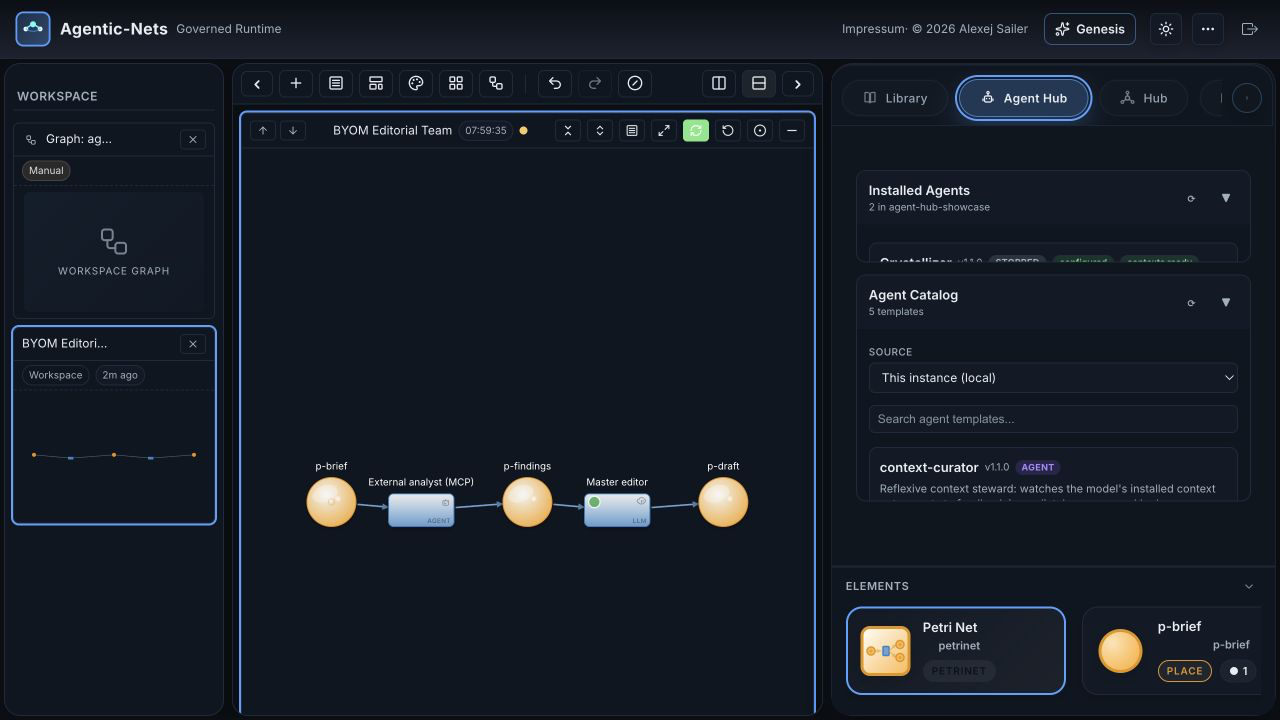
Underneath sits the same NetHub that already moves whole nets, sessions, models, contexts, tool nets, tools, catalogs, and blobs between instances, with credential scrubbing and explicit token policies on export. Agent and context upgrades are forward-only, preserve runtime tokens, and land stopped for review. If you missed that foundation, the MCP introduction covers how a client discovers and drives all of it.
One MCP Server, Two Tool Surfaces
MCP is no longer a thin memory adapter. In the default read-write configuration of 2.36, the server exposes 164 tools: 54 curated lowercase tools for the common workflows, plus 110 native uppercase tools generated from the same catalog used by agent transitions inside the runtime. That means an external client and an in-net persona learn the same platform vocabulary. The number will keep growing, but the division stays useful: start curated, drop to native when you need exact platform power.
| Surface | Important capabilities |
|---|---|
| Memory and context | Write, recall, link, traverse graphs, create context nets, and attach scoped capsules. |
| Build and run | Create models, sessions, nets, places, transitions, arcs, schedules, personas, and tool nets. |
| External execution | Host a transition in a local provider loop, or let the connected model prepare and complete an external fire itself. |
| NetHub | Publish, search, inspect, install, and federate versioned artifacts across instances. |
| Operate | Readiness, net statistics, usage reports, event trails, dry runs, inscription verification, and transition diagnosis. |
| Security boundary | Gateway-enforced readonly mode, a per-server model allowlist, optional model creation, and a separate Docker-tool grant. |
The same server runs over stdio for a local desktop or coding-agent session, or authenticated HTTP for a shared service. It also publishes MCP resources, prompts, initialization instructions, and a bundled knowledge base, so a client can discover not only which tool to call but the operating rules behind it. Two execution paths matter: host_transition runs an unattended client-side loop against a configured provider, while external fires need no provider configuration because the connected model itself supplies each answer.
A Memory That Organizes Itself
The use case: your agents learn things every day (API quirks, decisions, domain facts) and you want that knowledge to survive, stay findable, and improve, without appointing a human librarian.
Context nets are a new kind of net (kind: context) whose places hold knowledge and whose links carry typed relations: contains, references, derives-from, supersedes, promotes-to. Agents get navigation and authoring tools for them, so a persona can walk the graph to the right context instead of being handed a wall of text. Two resident meta-agents keep the garden tended: a curator that files and links new knowledge, and a crystallizer that turns repeated patterns into durable, cheaper structure. Model-wide domain memory converges into the same graph, so everything an agent team learns lands in one navigable place.
Paired with this, context capsules scope what each agent transition actually sees: instead of every agent reading everything, a capsule resolves the slice of context a persona needs for its role. Focused context is cheaper and measurably less hallucination-prone.
Guardrails: Spend, Secrets, and Scope
The use case: you are the person who answers for the bill and the blast radius. Autonomous agents overnight sound great until one loops.
The LLM kill switch is a fleet-wide freeze in the GUI’s new Runtime Controls: one click and every master stops spending, interactive calls answer with a clear locked status, and autonomous fires simply hold their tokens and resume when you unfreeze. It survives restarts. Next to it sits the auto-freeze breaker: give it a 24 hour token budget and a runaway loop trips the freeze on its own. External fires are deliberately exempt from both meters, because they spend your client-side quota, not the server’s.
Capability profiles harden what an agent may touch: tool access is deny-by-default and scoped per persona, so your research analyst cannot suddenly run shell commands because a prompt told it to. And credential lifecycle tools complete the secrets story: transition credentials live in an OpenBao vault, are injected at fire time, and can be set, listed, rotated, and deleted through the same tools agents and MCP clients already use. If governance is your entry point, start with the software team that ships while you sleep.
The Ten Capability Flags
The positional role string rwxhludcts is the coarse upper bound. A role-less agent defaults to lean rw, not full power. Named capability profiles, explicit tool allowlists, and resource scopes can narrow that boundary further for a particular fire.
| Flag | Capability | Examples |
|---|---|---|
| r | Read | Inspect nets, places, tokens, models, contexts, and package metadata. |
| w | Write | Create tokens and structure; author, register, or promote tool nets. |
| x | Execute | Deploy, start, stop, fire, and run transitions. |
| h | HTTP | Call and register external HTTP services. |
| l | Logs | Query events, facets, and fire trails. |
| u | Inhabit | Await tokens and use fire-and-wait interaction patterns. |
| d | Docker | Discover, validate, run, stop, and inspect container tools. |
| c | Coordinate | Invoke personas, delegate tasks, and collect their results. |
| t | Tool nets | Discover, inspect, and invoke reusable capability nets. |
| s | Scripts | Register executable script artifacts in the tool catalog. |
The Boring Reliability Work (That You Will Feel Most)
- Models auto-load on restart. Mark a model auto-load and a rebooted server brings it back running, transitions and all. The setting is explicit per model, so a cataloged model stays parked until it is wanted.
- Big work no longer starves quietly. Executors previously dropped oversized work batches at a debug log level, which could stall command lanes for hours. The buffer is now 16 MB and the failure mode is loud.
- One-call diagnosis. The MCP
readinesstool checks the whole dependency chain (gateway auth, node, model state, LLM provider, executor coverage) and returns per-layer verdicts plus a problem list. Run it first on any new connection.
Everything This Lands On: The Platform in One Tour
The features above are two weeks of momentum. What they land on is a platform that has been compounding for months. If you are evaluating Agentic-Nets, this is the box, structured.
Seven Building Blocks, One Executable Net
Every workflow is one net built from seven transition kinds: pass routes tokens, map transforms them with templates, http calls any API with auth and retries, llm makes a single model call, agent runs an autonomous multi-step persona, command executes shell work on distributed executors, and link draws typed knowledge edges. Deterministic lanes and AI lanes are peers in the same graph, which is what makes the crystallization pattern work: let an agent solve the problem while it is novel, then freeze the repeatable part into map, http, and command steps that cost nothing to think. The net gets cheaper the longer it runs.
Custom Net Agents: Personas That Live in the Net
An agent transition is a persona living inside the net: a natural-language charter, a model tier, and a positional capability string (rwxhludcts) granting exactly the powers it needs: read, write, execute, HTTP, logs, awaiting tokens, Docker tools, coordinating other personas, invoking tool nets, registering scripts. One call (spawn_persona) scaffolds a complete self-driving team member: charter, task inbox, armed agent transition, output place. Personas coordinate through shared places instead of point-to-point chat, so a roster scales from three to dozens without a communication explosion, and a meta-persona can interview you about a goal and spawn the specialists it decides the job needs.
Tool Nets: Automation That Earns Reuse
Some automations deserve to become tools. A tool net is a sub-net with a declared interface that any agent, or any other net, can invoke as a single call. Scaffold one around a working lane, test it, promote it into the library, and from then on personas discover and reuse it instead of reinventing it. There is even a shortcut from conversation to tool: crystallize_session records what a working session actually did and bakes those steps into a replayable tool net. Your best one-off becomes everyone’s building block.
The Tool Catalog: Docker Images, HTTP Services, Scripts
Agents do not get raw access to your machine; they get a catalog. Four binding types live in it: Docker images (discovered from an OCI registry, wrapped into callable tools, pinned by digest so what ran yesterday is what runs today), HTTP services, executable scripts (run on the executor fleet through ordinary command lanes), and the tool nets above. The catalog is layered: a global default plus a per-model catalog that shadows it, so every model can carry its own toolbox. And each binding type is gated by its own capability flag, so granting a persona scripts does not quietly grant it containers.
NetHub: Ship Whole Systems, Not Snippets
Everything you build is a shippable artifact. NetHub publishes and installs nine package kinds: nets, sessions, whole models, agent teams, context systems, tool nets, individual tools, catalogs, and raw blobs. Publish scans inscriptions for referenced tool IDs, images, and blob URNs, then bundles and hash-verifies those dependencies so an installed package actually runs. Every export has an explicit token policy (none, configuration only, or all), while credentials are always scrubbed. Add a peer instance as a remote and you have federation: publish on one stack, install on another, or opt your catalog into anonymous public read for a community. It is the difference between sharing a screenshot of your automation and handing someone the automation.
Schedules, Watchers, and Spawned Coding Agents
Any executable transition accepts a cron or interval schedule that ticks server-side forever, so nets act while everyone sleeps. The watcher template is the minimal case: a zero-LLM sentinel that probes a URL on a schedule and fires a webhook the moment it is not healthy. At the other end of the spectrum, command transitions can spawn full coding agents: a lane that launches Claude Code with scoped tools against a real repository is just another transition, which is exactly how our own software team net ships code overnight. Starter templates (working-memory, dev-team, brain, watcher) deploy any of these shapes in one call.
Watch Everything: The Meter and the Story
Every fire writes to an event line you can read as a story: what fired, what it consumed, what it produced, what an agent was thinking between tool calls. usage_report is the token meter, ranked per transition and split into scheduled versus work-driven burn, so idle cost has nowhere to hide (the method is in Watching the Meter). The ops floor is standard: Prometheus metrics, Tempo traces, Loki logs, Grafana dashboards. Executors poll egress-only (firewall-friendly, no inbound ports) and scale out horizontally, and multi-master routing partitions models across brains when one is not enough.
Try It in Ten Minutes
Everything runs from Docker Hub images; the open-source repo carries the compose files. Release 2.36.0 is live today, including the kill switch, auto-freeze breaker, Agent Hub profiles, context system, and external fires described above.
# 1. Run the stack (all pre-built images)
git clone https://github.com/alexejsailer/agentic-nets
cd agentic-nets/deployment
cp .env.template .env
docker compose -f docker-compose.hub-only.yml up -d

# 2. Connect your Claude session to it
claude mcp add agenticnets \
  -e AGENTICOS_GATEWAY_URL=http://localhost:8083 \
  -e AGENTICOS_ADMIN_SECRET=$(cat data/gateway/jwt/admin-secret) \
  -e AGENTICOS_MODELS=my-first-model \
  -- npx @agenticnets/mcp
Then, from inside your Claude session: readiness to verify the chain, create_model to mint a workspace (optionally with a research, knowledge, or development profile), deploy_template working-memory for a running memory system, and set_external on an llm or agent lane to make your own subscription its engine. The GUI at localhost:4200 shows every place, token, and fire as it happens.
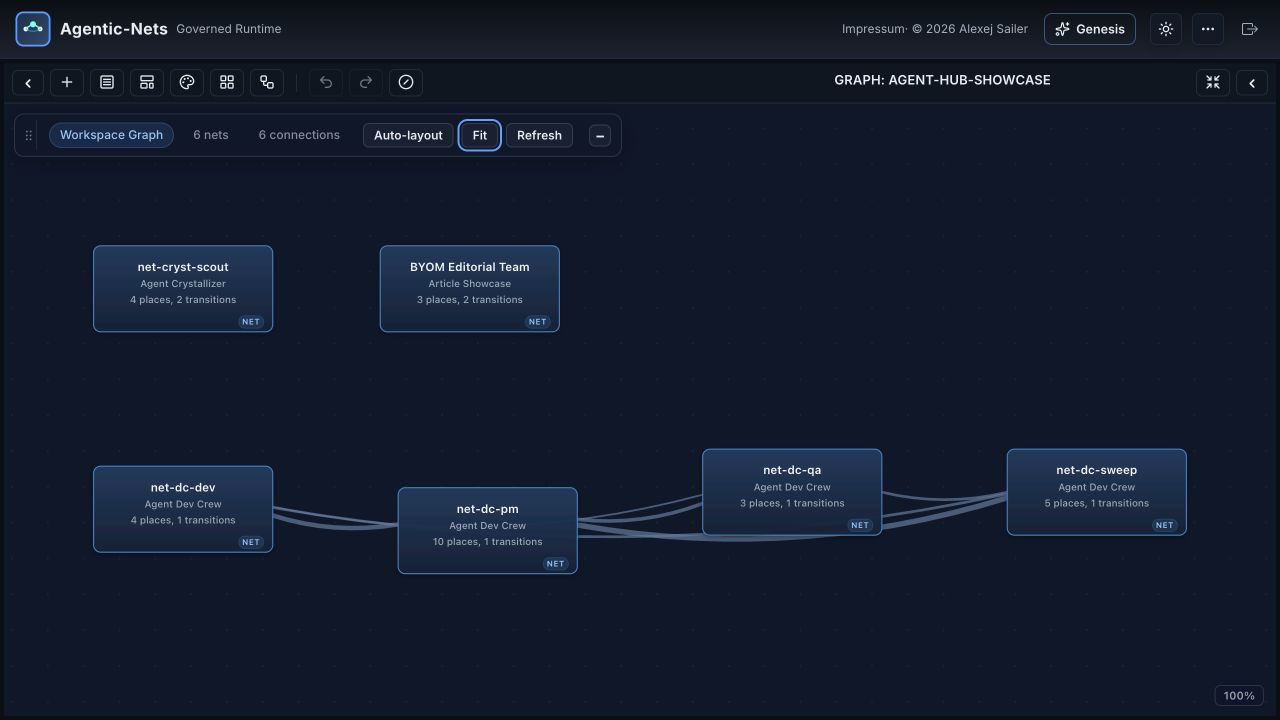
Written from the release notes and a live Agentic-Nets 2.36.0 stack. The screenshots use a local development-profile model installed through MCP: NetHub supplied the Dev Crew and Crystallizer sessions, while a separate editorial net mixes an external agent lane with a master-run llm lane.
Related: AgenticNetOS Now Speaks MCP • The Guided Tour • Watching the Meter