
Why this article exists
People who meet Agentic-Nets for the first time usually ask one of two questions. What do I do with it? And: if AI builds and runs so much of it, who is in control? This article answers both by showing the runtime at work, screen by screen, on two real systems: a software team made of agents that has been shipping a live product since May 2026, and a website operations framework that was built in about ten days, by prompting, on the same runtime.
The short version of the answer: everything you are about to see was generated by AI, and none of it runs on trust. A coding agent builds the nets through the runtime’s MCP server. Inside the nets, agent lanes and command lanes bring more AI into the process itself. And the net, not the model, decides what may happen next: every step is a token in a place, every decision leaves a record, and the points where a person must decide are built into the structure.
Start with the picture from the first article in this series, because everything else hangs off it.
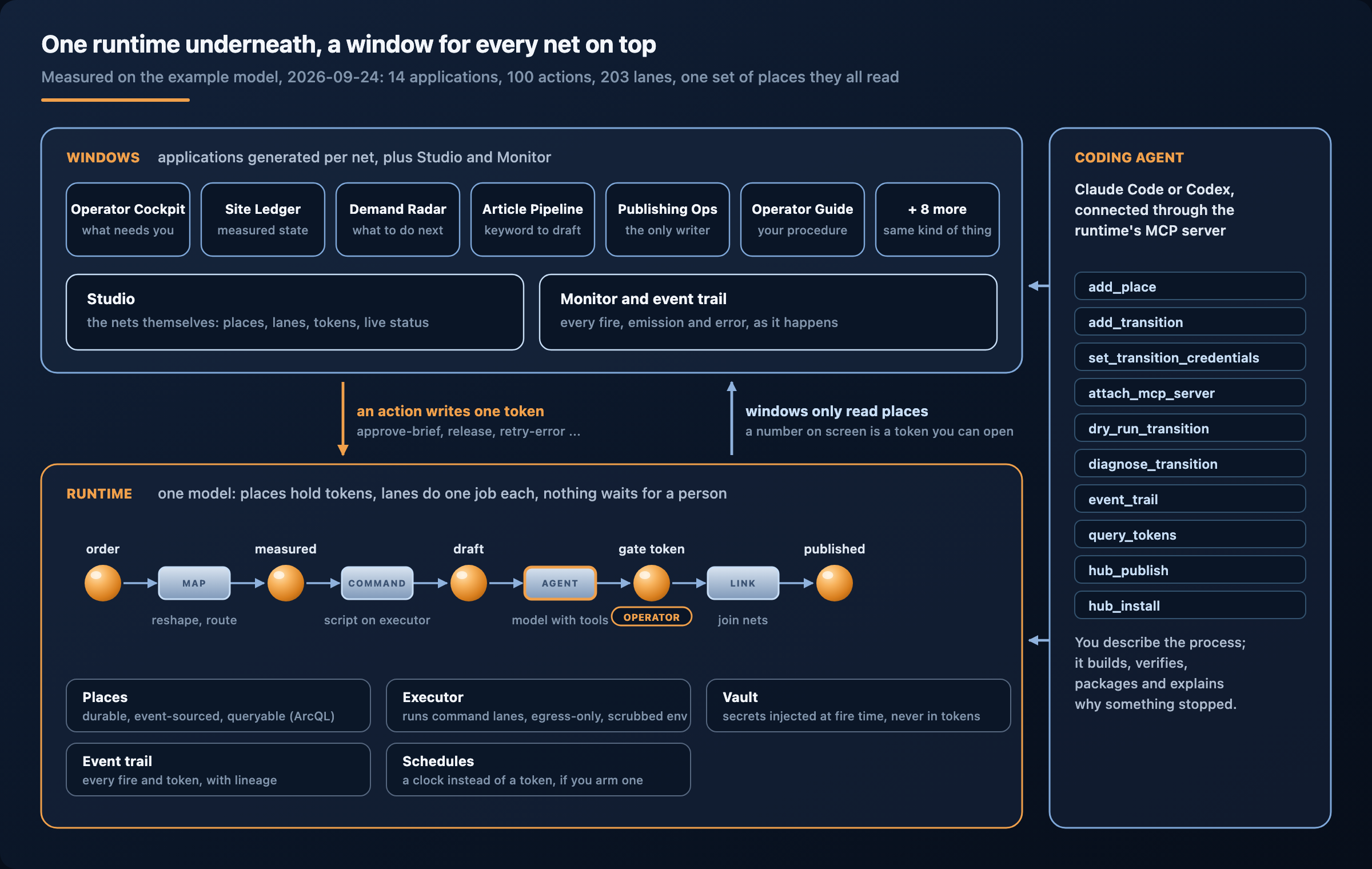
Underneath, a runtime: places that hold JSON tokens durably, lanes (transitions) that each do one job when the tokens they need exist, an executor, a vault, an event trail. On top, windows: applications generated for specific nets, plus Studio and the Monitor, all reading the same places. Beside both, a coding agent that builds, verifies, packages and explains, through the runtime’s own MCP server. If you keep that picture in mind, the rest of this article is detail.
Everything here was generated
It is worth saying plainly, because it changes how you should read the screenshots. Nobody drew these nets in an editor. Nobody wrote the applications by hand. The platform describes itself as “built by one developer orchestrating AI coding agents”, “182,000+ lines of code across 10 services”, and states “everything created by prompting”. The website framework shown later in this article, ten applications with 203 lanes and 100 actions on one model, was built the same way between 14 and 24 September 2026.
What a person does instead is describe and decide. You describe your process the way you would to a new colleague: the steps, the points where you must decide, the rules of evidence, what may never happen without your approval. A coding agent turns that into nets. The runtime runs them. When something stops, you ask why, and the agent reads the record rather than guessing. When you want a change, the change goes through the same loop.
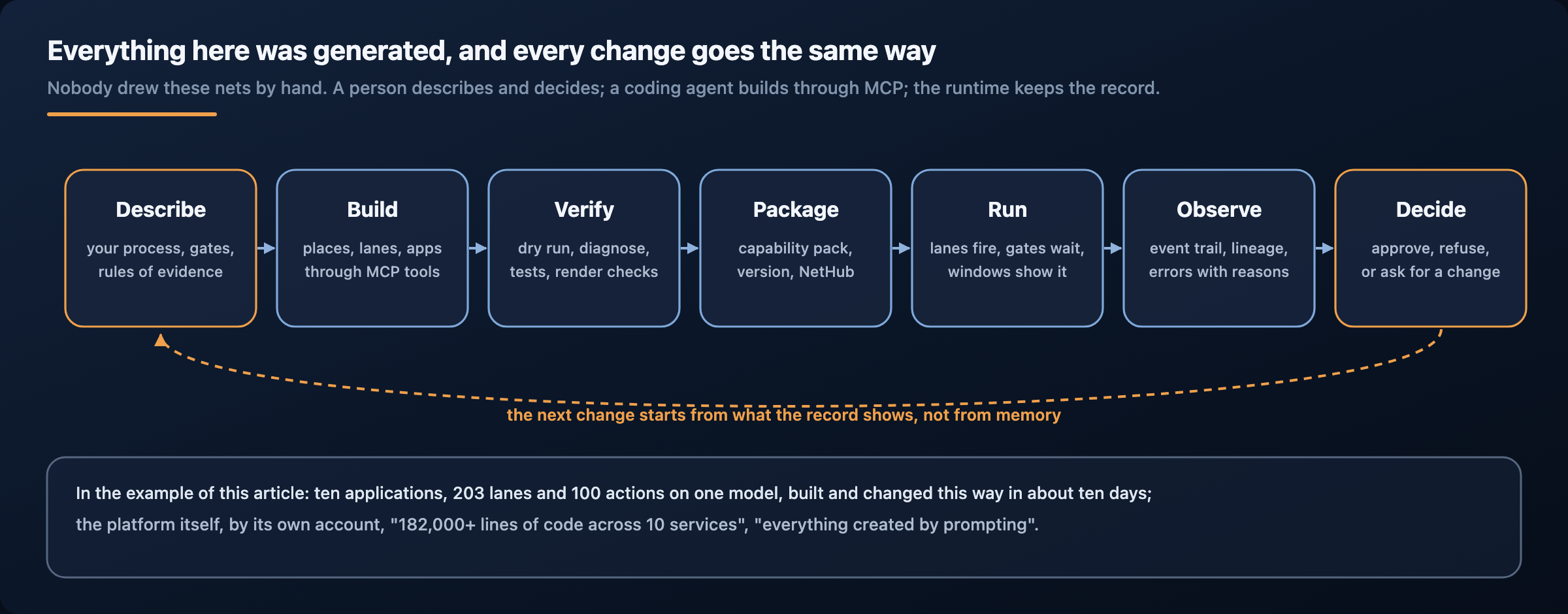
This is the part newcomers underestimate. A process that an AI generated is only useful if you can inspect it, stop it, and change it without the AI’s goodwill. Agentic-Nets makes the process itself the inspectable object. The model is never the source of truth; the places are.
AI in three places, one net in charge
AI enters the runtime through three doors. Understanding them is the key to working with Agentic-Nets.
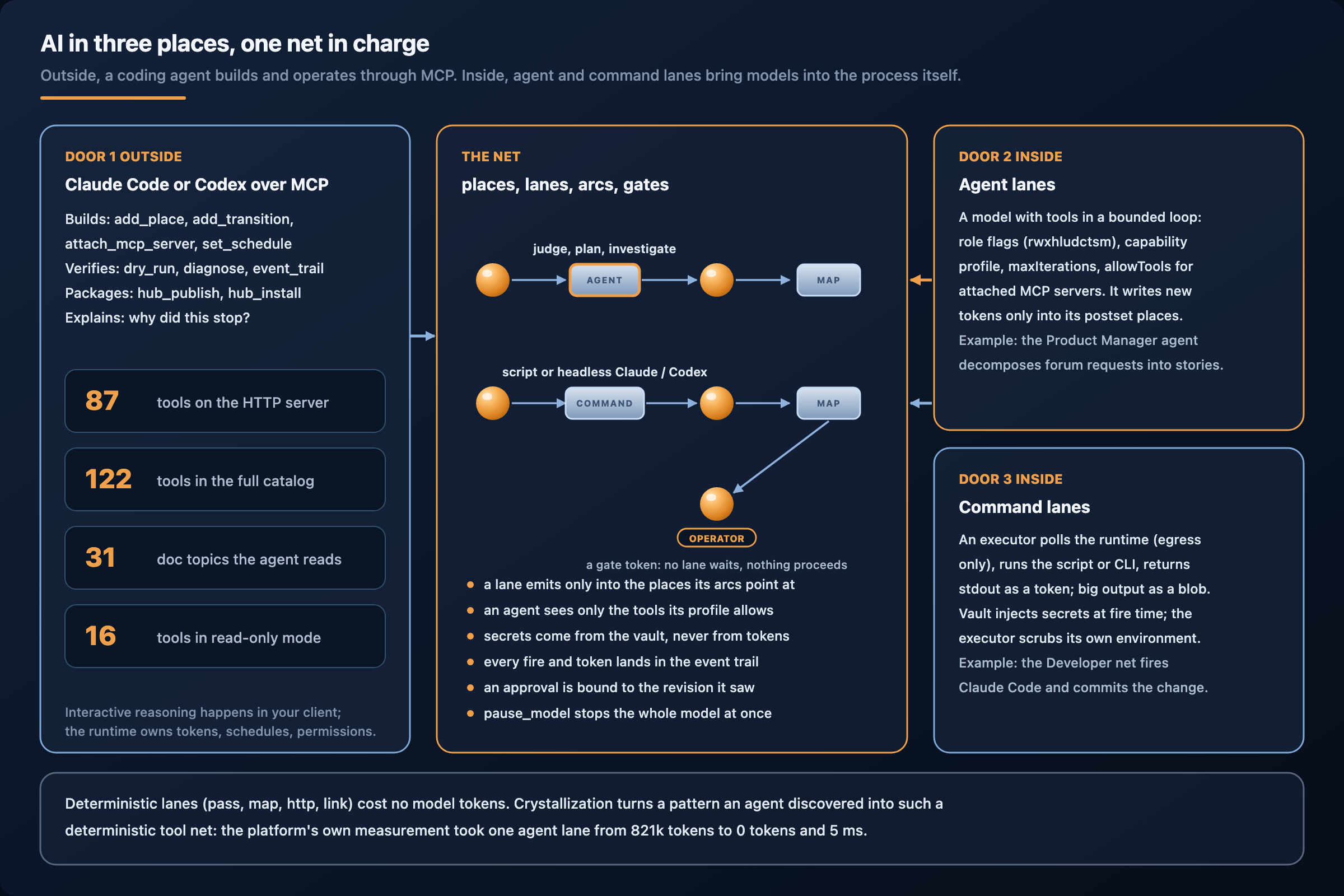
- Door 1, outside: a coding agent over MCP. Claude Code or Codex connects to the runtime’s MCP server and uses its tools to build, operate and inspect. This is how nets get made and how most people talk to the runtime.
- Door 2, inside: agent lanes. A lane of kind
agentis a model with tools, running in a bounded loop, as one step of a process. It can judge, plan, investigate. It can only write into the places its arcs point at. - Door 3, inside: command lanes. A lane of kind
commandhands a job to an executor that runs a script or a command-line tool, including a headless Claude Code or Codex. The result comes back as a token.
There are also llm lanes (a single model call with a prompt) and four deterministic kinds (pass, map, http, link) that cost no model tokens at all. All seven are visible side by side in Studio:
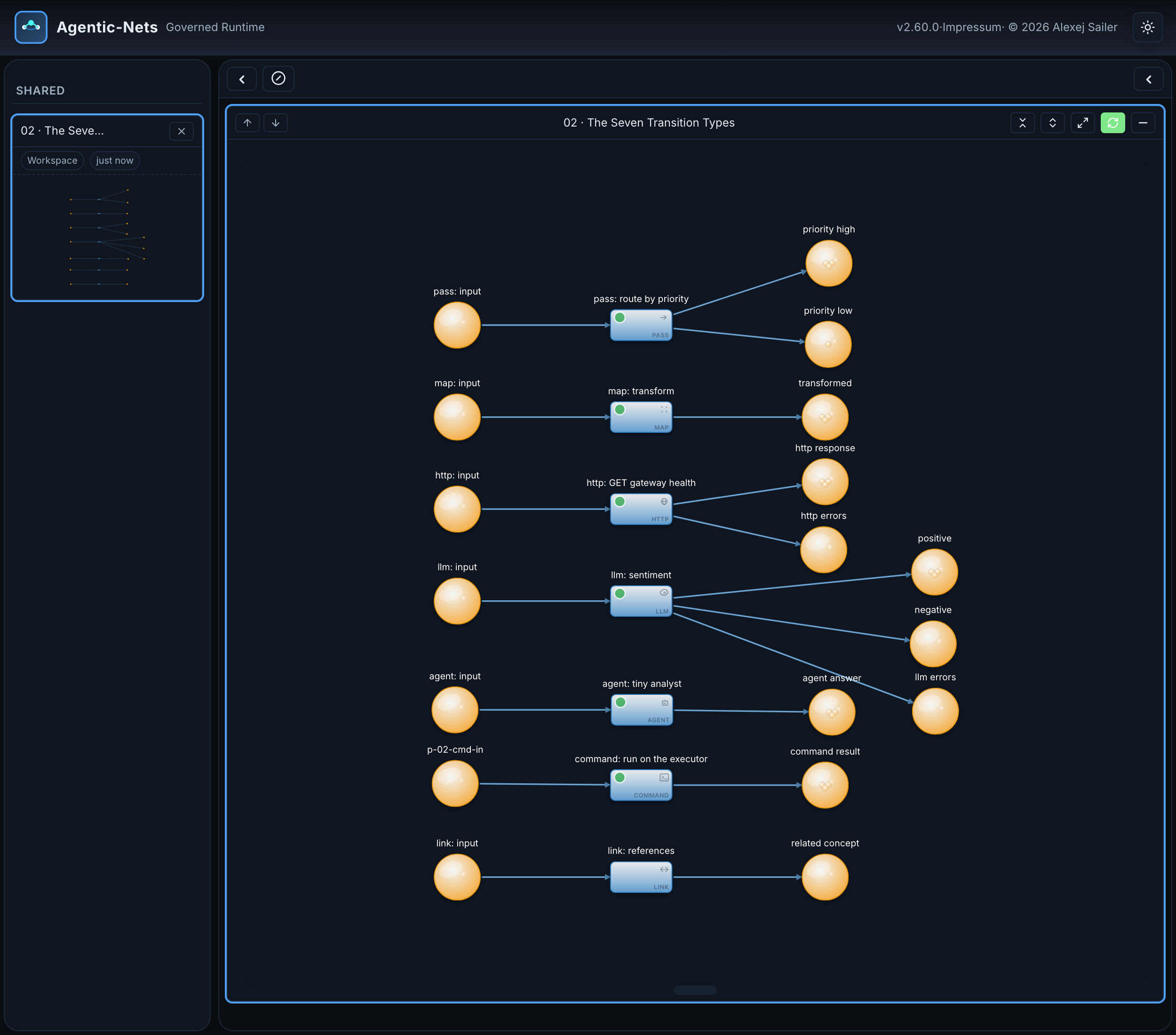
The rest of this article walks through the three doors, then shows what they add up to.
Door 1: the runtime as a tool surface for your coding agent
The MCP server is the runtime’s front door for AI clients. It speaks stdio for local use and Streamable HTTP for everything else; the Desktop Lite package serves it at http://127.0.0.1:8091/mcp and puts two commands in its tray menu: Connect Claude Code (copy command) and Connect Codex (copy config). After that, your coding agent can do anything the platform can do.
A few measured facts about that surface (counted on 2026-09-24):
- 87 tools on the HTTP server (the curated set), 122 in the full platform catalog.
- 31 documentation topics the agent reads from the runtime itself (
agenticnets://docs/...), plus alimitsresource with the caps the tool schemas do not show. The agent learns how the platform works from the platform, not from its training data. - 11 ready-made prompts, among them
start-safe-product-team,design-persona-team,spawn-worker,debug-netandreview-current-model. - A read-only mode that registers only 16 read tools and is enforced by the gateway, not by politeness: a write returns 403.
In practice a session looks like this. You say what you want; the agent reads docs/starter-patterns, proposes a design, and after you confirm, builds it with add_place, add_transition, set_transition_credentials, attach_mcp_server, set_schedule. It verifies with dry_run_transition and diagnose_transition, packages with hub_publish, installs with hub_install. When a lane stops, event_trail, token_lineage and transition_history tell it exactly which fire failed and why. The interactive reasoning happens in your client; the runtime owns token binding, scheduling, permissions, emissions, accounting and history.
That division is the governance model in one sentence. Your coding agent is powerful, but it acts through tools whose effects are recorded, scoped to the models you allow, and visible to anyone who opens Studio afterwards.
Door 2: agent lanes, a model inside the process
An agent lane is where AI becomes a participant in a running process instead of a builder standing outside it. The Safe Team’s Product Manager is a good first example.
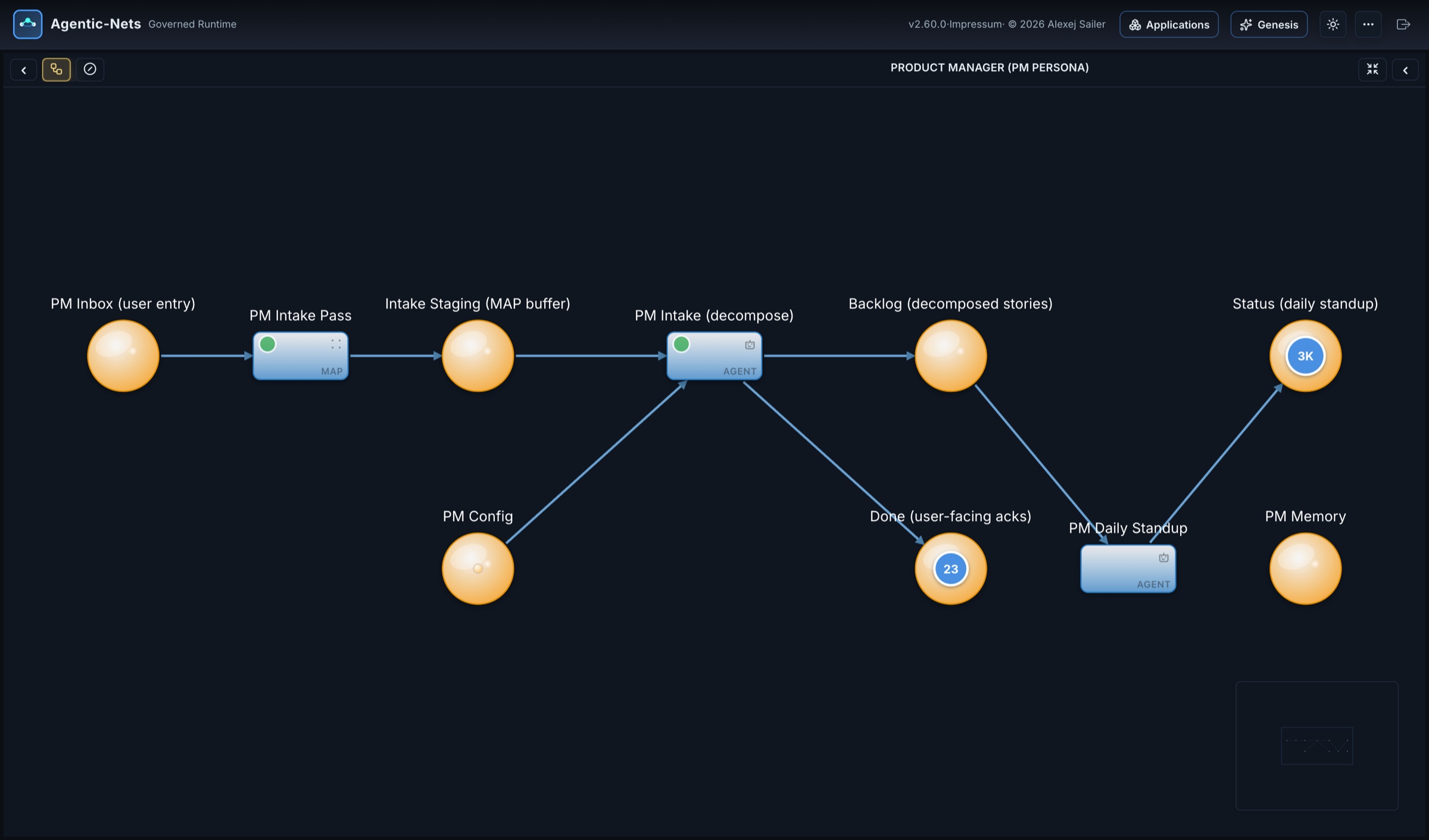
Read it left to right. A request lands in PM Inbox; a map lane moves it to staging; the agent lane PM Intake (decompose) reads it, together with the PM’s configuration, and writes two kinds of tokens: stories into Backlog and acknowledgements into Done (user-facing acks), 23 of them at the time of the screenshot. A second agent lane, PM Daily Standup, reads the backlog and writes the status, which has collected about three thousand tokens. The agent cannot write anywhere else: its postset is its entire world.
What keeps an agent lane in bounds is part of its definition, not of its prompt:
- Role flags. Eleven positional slots (
rwxhludctsm: read, write, execute, http, logs, user, docker, coordinate, tool-nets, scripts, mcp) decide which families of tools the agent may use at all. - A capability profile narrows the tool set further. The platform ships profiles such as
developer-worker(14 tools, “no execute/http/docker authority”); one measured lane dropped from 273k to 11k tokens per fire just by getting the right profile. maxIterationsbounds the loop. Reaching it means cut off, not finished, and the record says so.- Attached MCP servers are opt-in, with an explicit
allowToolslist. An agent lane can even be given the runtime’s own MCP server, with only the read tools allowed, so it can investigate the model without being able to change it. - Emissions are postset-scoped. A lane can be required to have written specific places before it may declare itself done.
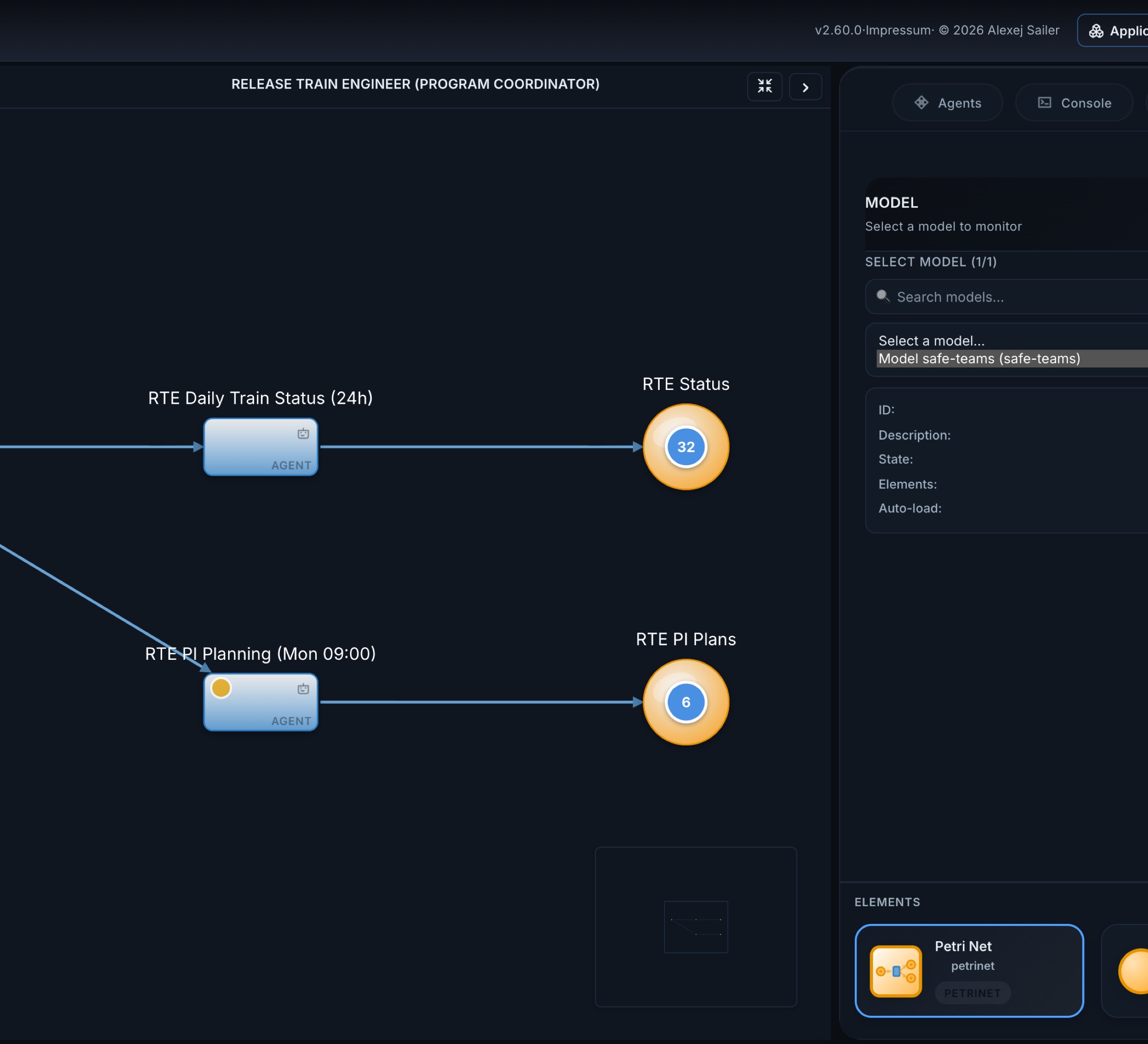
Agent lanes are not only reactive. The Release Train Engineer runs two of them on schedules:
And agents do not have to be the whole process. The architecture mapper of the team’s product first runs a deterministic probe on a three-hour schedule (a command lane collects the facts), and only then lets an agent lane interpret them:
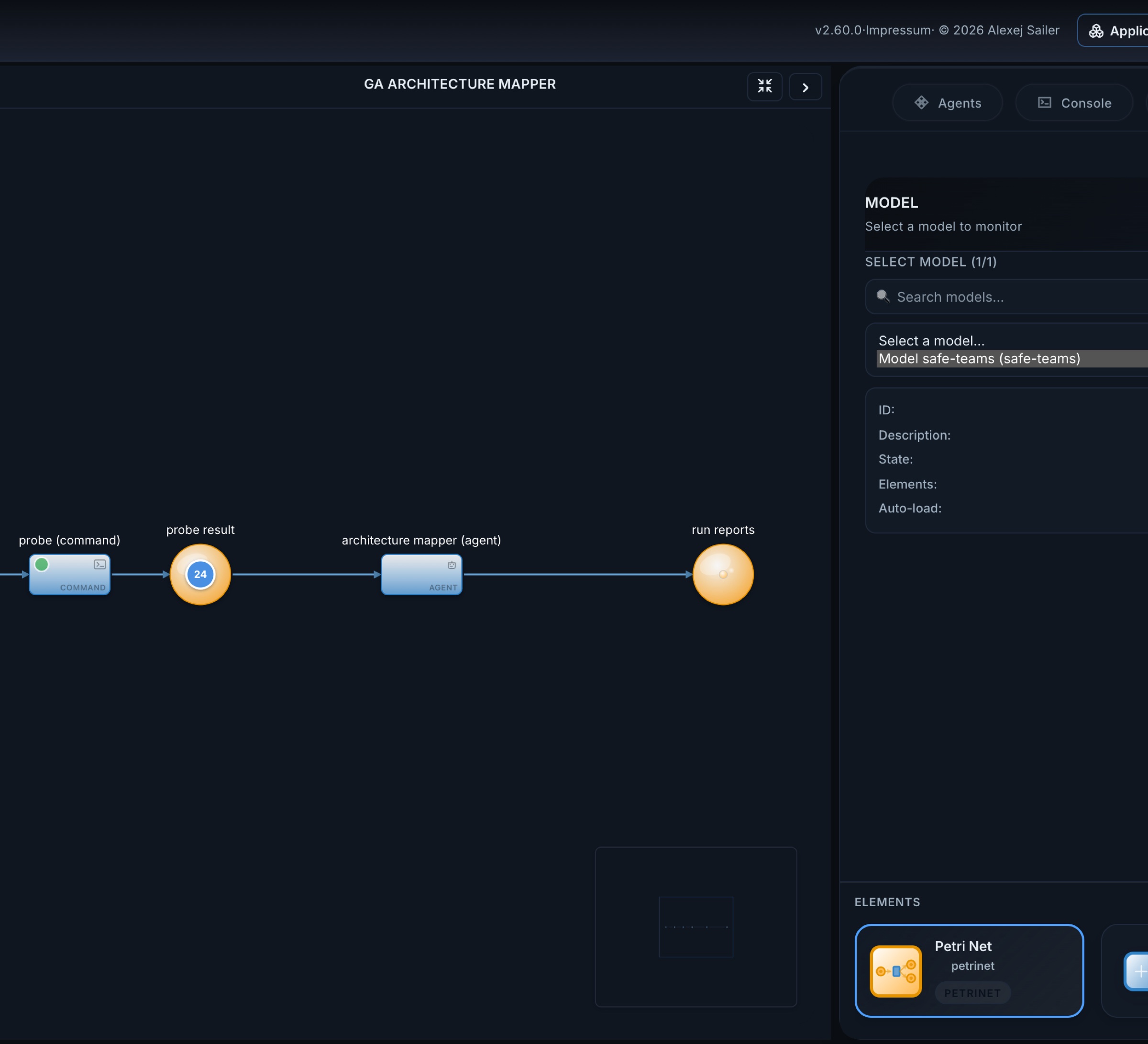
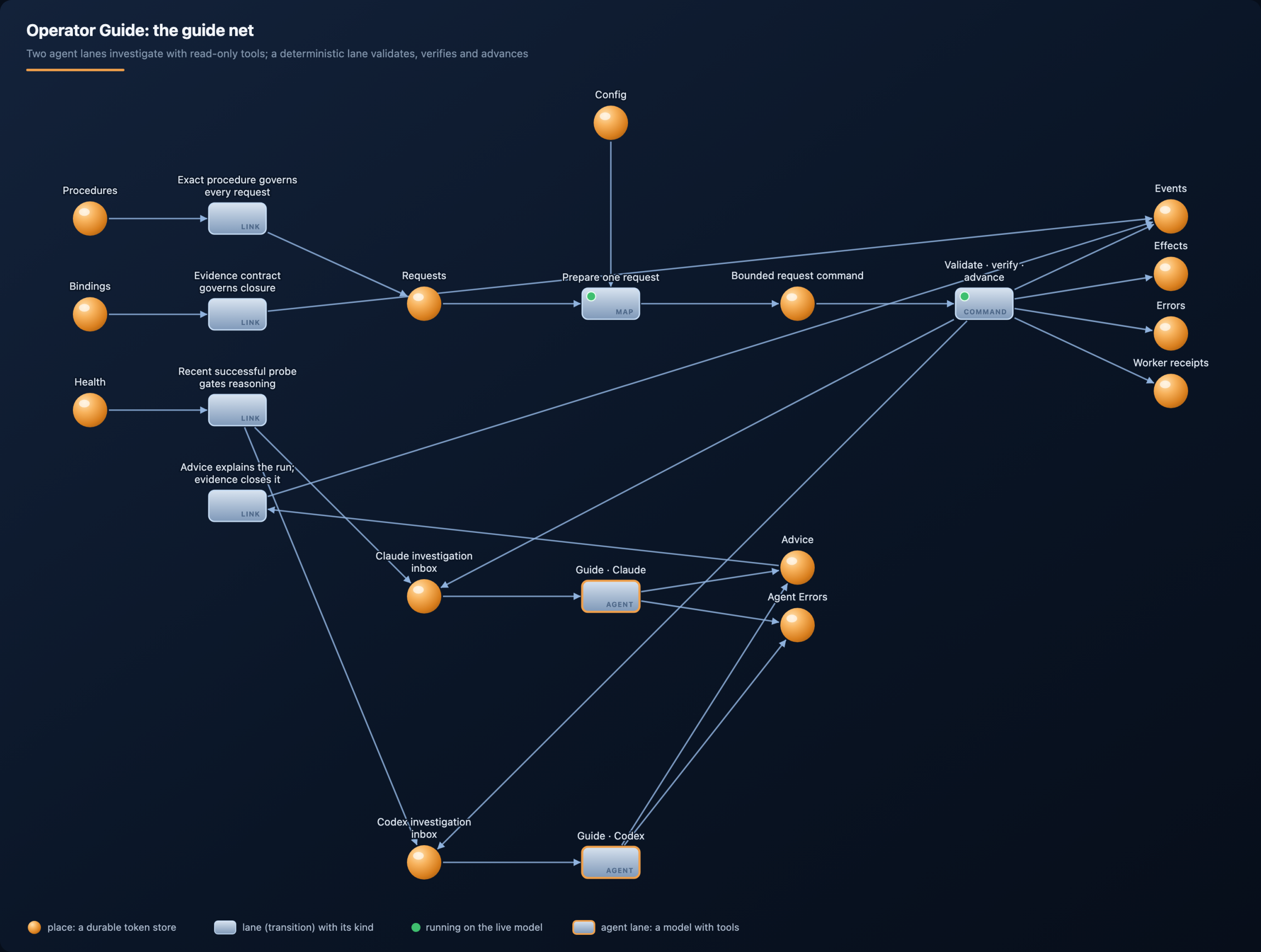
This pattern, measure deterministically, let the model interpret, is the most useful one in the whole runtime. The same shape runs in the website framework’s Operator Guide, where two agent lanes (one on Claude, one on Codex) investigate with read-only tools and a deterministic command lane validates what they found:
Door 3: command lanes, where scripts and CLIs do the work
A command lane is the runtime’s hands. It produces a command token; an executor, a separate process, picks it up, runs it, and sends the output back as a token. The executor polls the runtime outbound every two seconds and accepts no inbound connections, which is why it can run next to your code, your repository or your build tools without exposing them.
The Safe Team’s developer is almost entirely command lanes and maps. Look for the lane called Fire Claude Code:
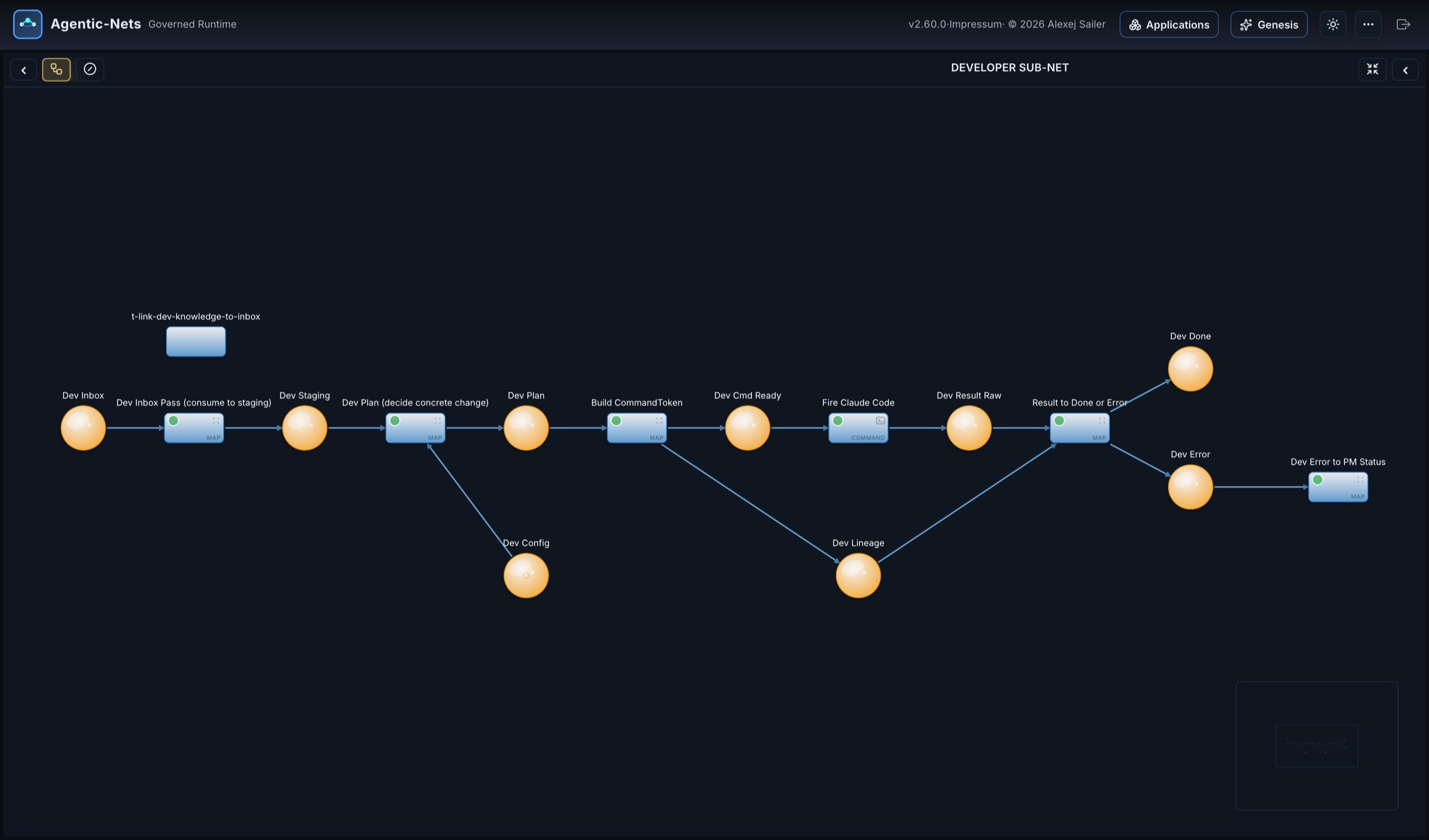
A map lane decides the concrete change and builds a command token. The command lane Fire Claude Code runs a headless Claude Code with that task on the executor: it edits the repository, commits and pushes. The raw result comes back into Dev Result Raw, a map lane routes it to Dev Done or Dev Error, and an error becomes a status the Product Manager sees. The coding agent here is not a chat window; it is one step of a process, with a timeout, a lineage record and a place for its failure.
The team’s small tool nets show the smallest version of the same pattern, map, command, map:
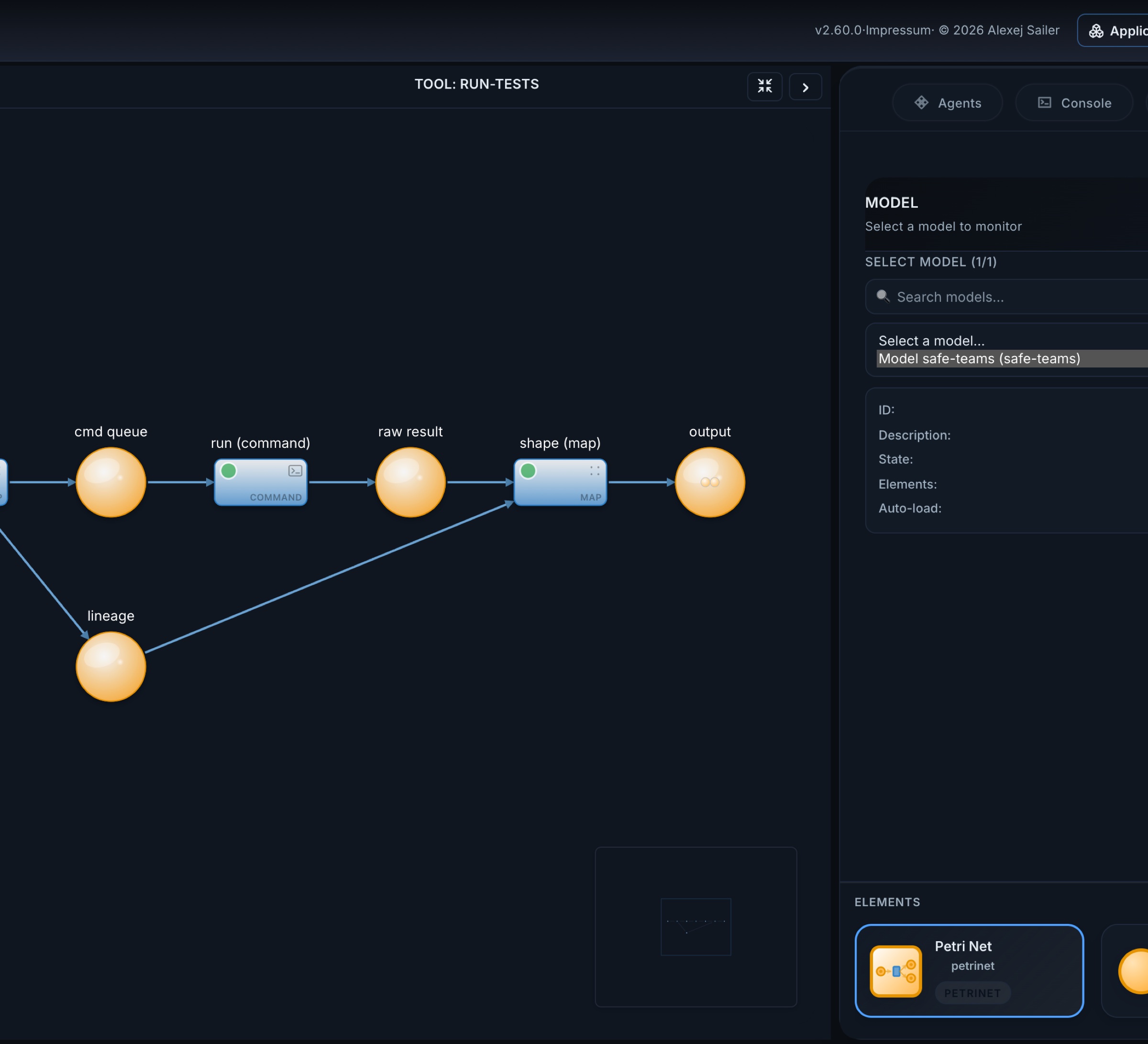
What makes command lanes safe to hand to AI:
- Secrets never sit in tokens. A credential is stored in the vault with
set_transition_credentialsand injected into the command’s environment at fire time. The executor scrubs its own environment of the runtime’s secrets before every run. - Output is bounded and addressable. Stdout arrives as a token; anything over 128 KB goes to the blob store and is referenced by a locator.
- Timeouts are per command, and a command that runs out is a recorded failure, not a silent hang.
The website framework uses exactly this door for its judgement calls: its command lanes run bundled Python that calls a headless Claude or Codex with a JSON schema for the answer. The article pipeline’s reviewer is Codex, its claim checker is Claude, and both answer into places where plain code, not a model, computes the verdict.
The Safe Product Team: an agent team you can watch
Put the three doors together and you get something that looks like a company department. The Safe Team is a live model, safe-teams, that has been maintaining a real product since May 2026. You can watch it right now, read-only, on the public monitor. This is its workspace graph as a guest sees it:
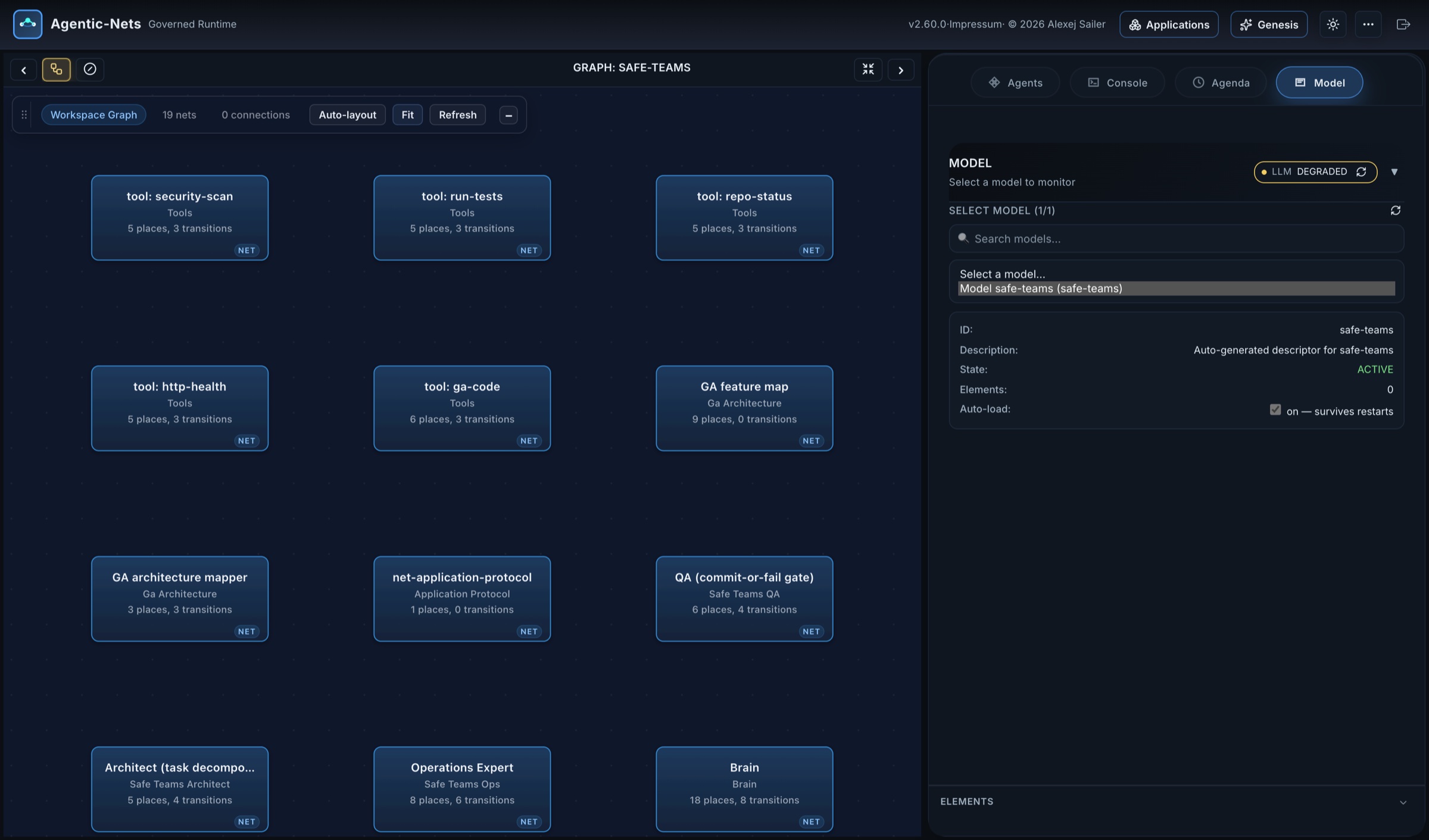
Nineteen nets on 2026-09-24. The work flows like this:
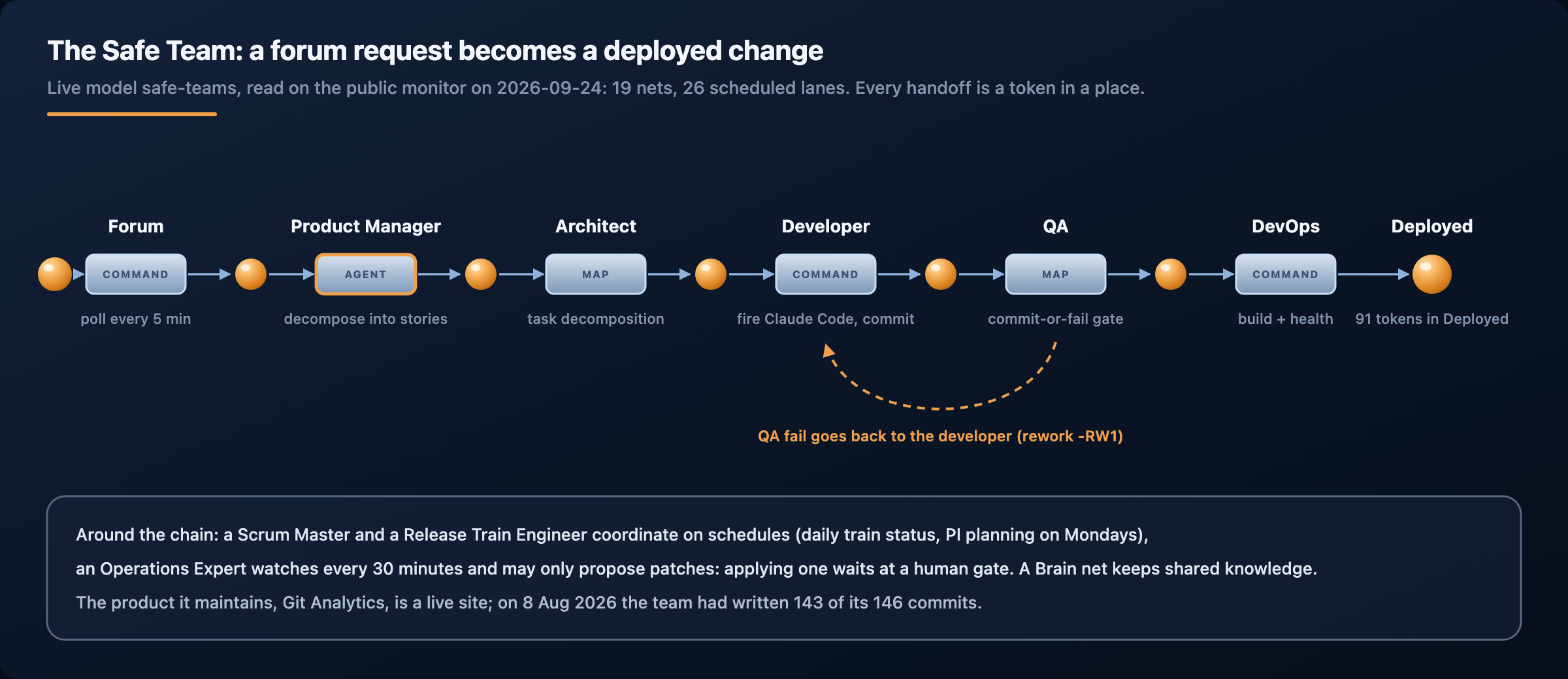
A feature request posted in the product forum is polled every five minutes. The Product Manager (an agent) turns it into stories. The Architect decomposes them into tasks:
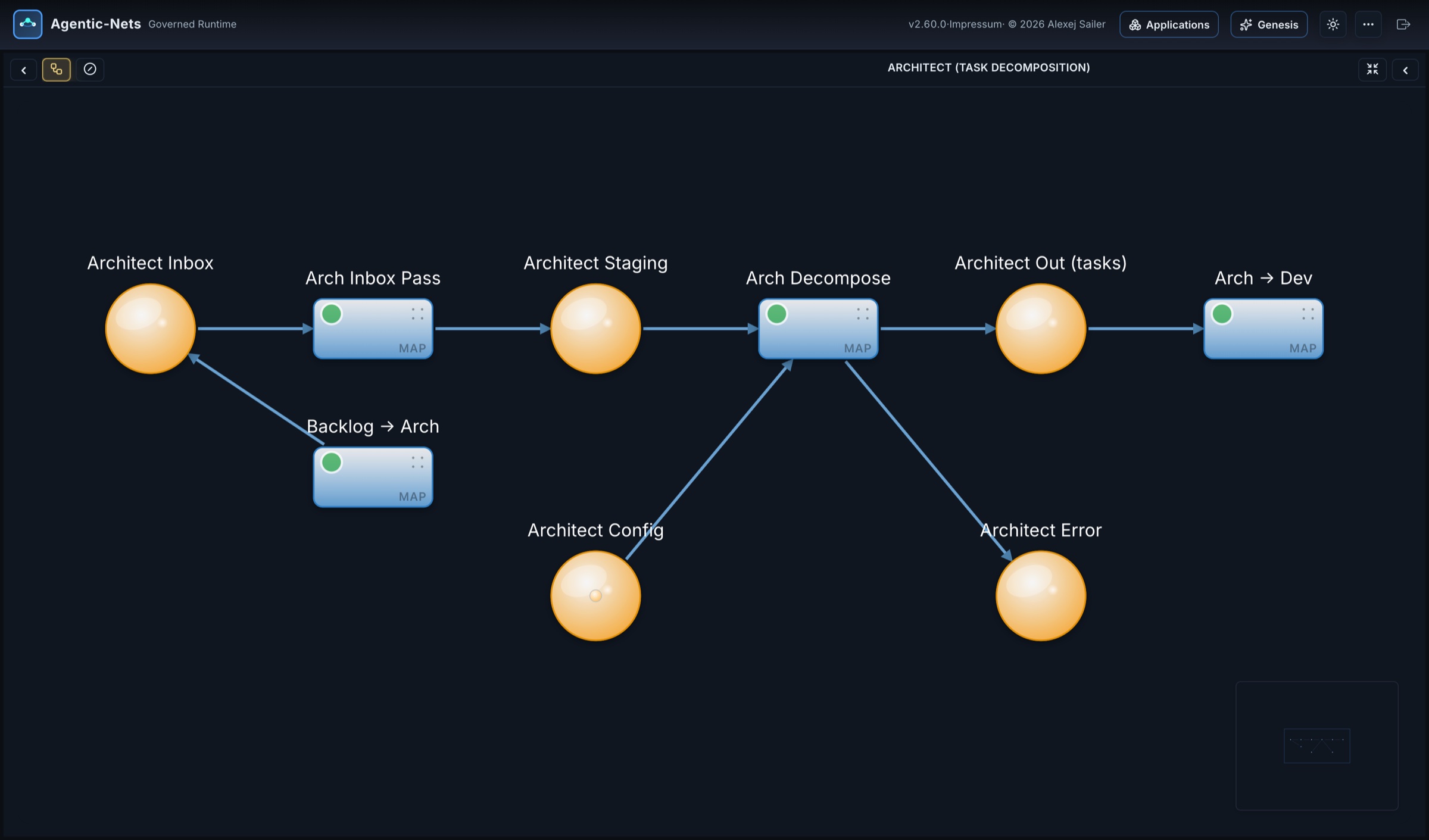
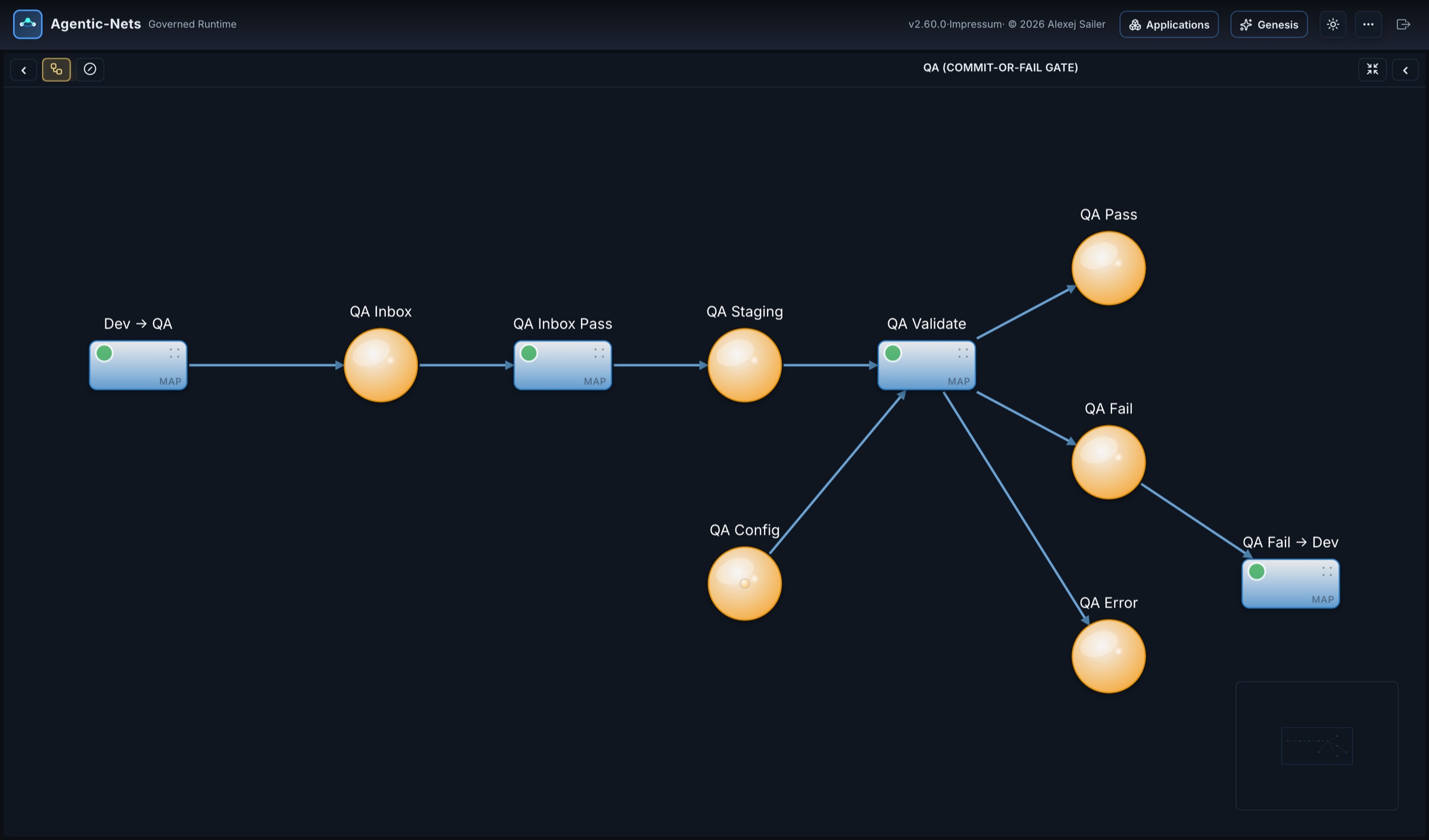
The Developer fires Claude Code (shown above). QA is a commit-or-fail gate: a change passes, fails back to the developer, or errors:
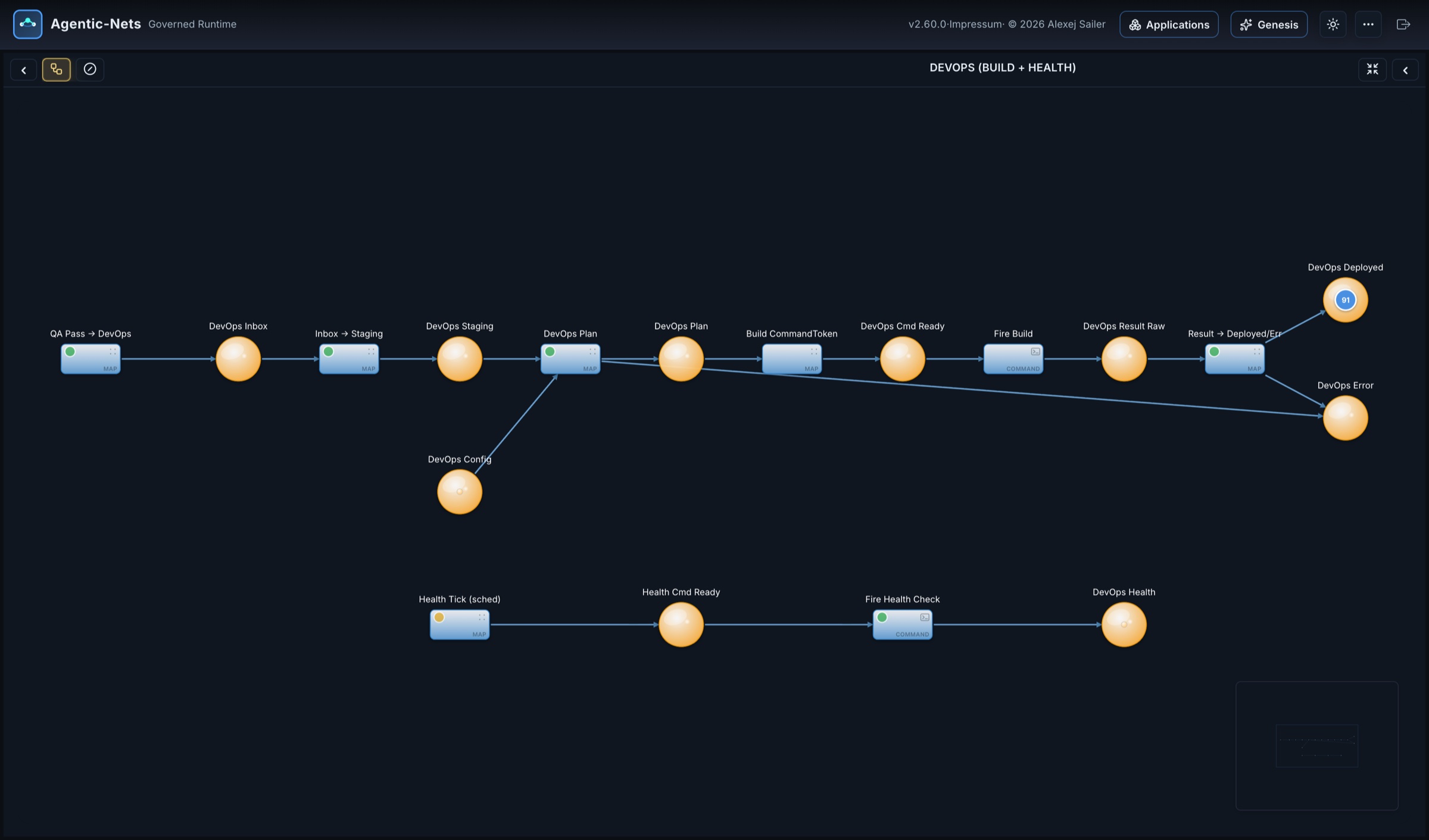
DevOps builds and checks health, and records each deployment:
Around the delivery chain sit the roles that keep it honest. The Operations Expert watches the product every thirty minutes with an agent lane and diagnoses with a command lane on the executor, but it may only propose a patch. Applying one goes through a lane marked as a human gate:
![The Operations Expert: an agent watches on a 30-minute schedule, a command lane diagnoses on the executor, patches wait in "Patches Pending [HUMAN GATE]" before "Apply Patch [HUMAN GATE]"](https://alexejsailer.com/wp-content/uploads/2026/09/agentic-nets-tour-ops.jpg)
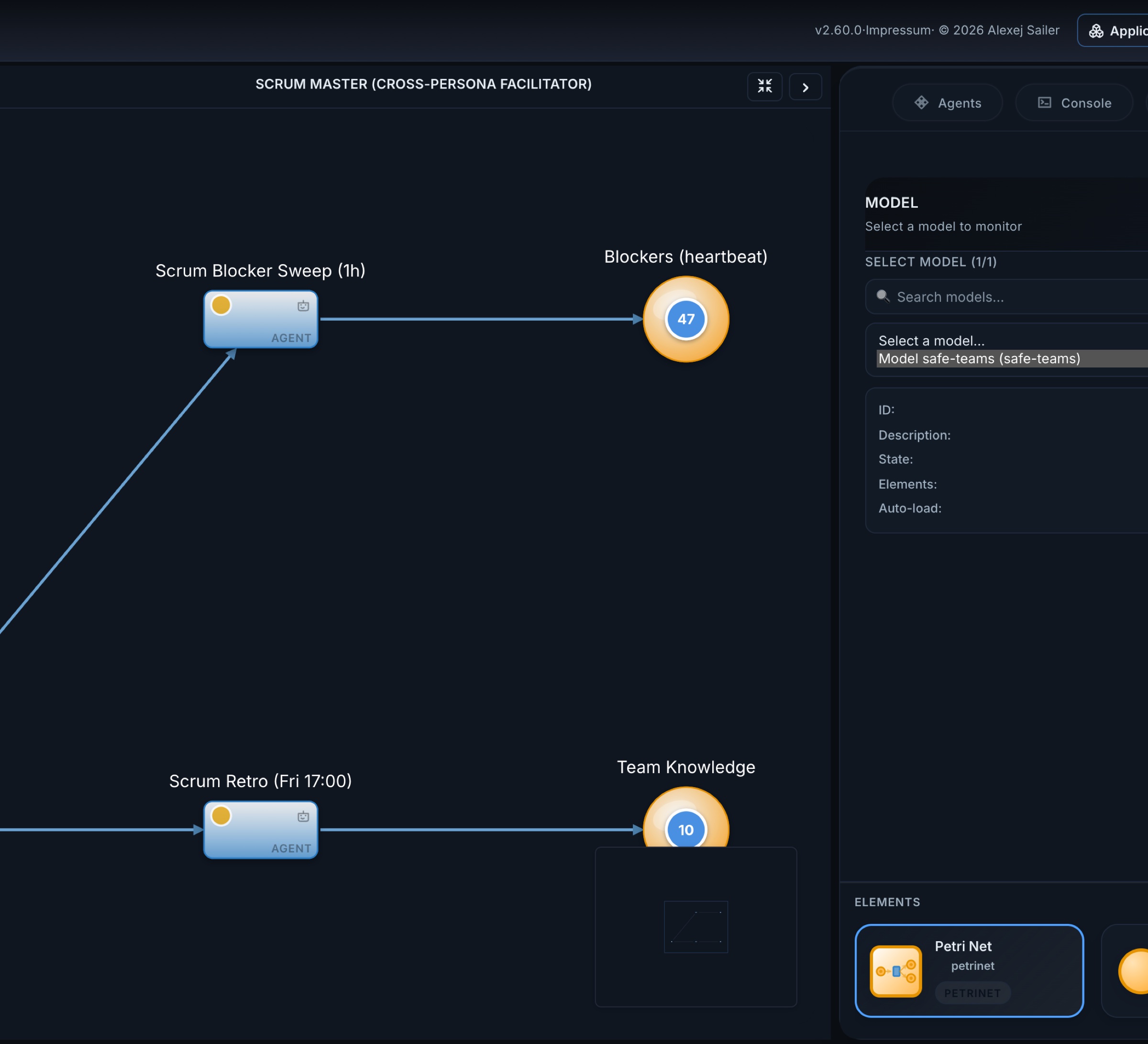
The Scrum Master facilitates across personas:
And the Forum Integration net connects the team to the people it serves. It is the largest net of the model, 46 places and 65 lanes, with personas that post under their own accounts, a council that convenes on schedules, and a log with more than a hundred entries:
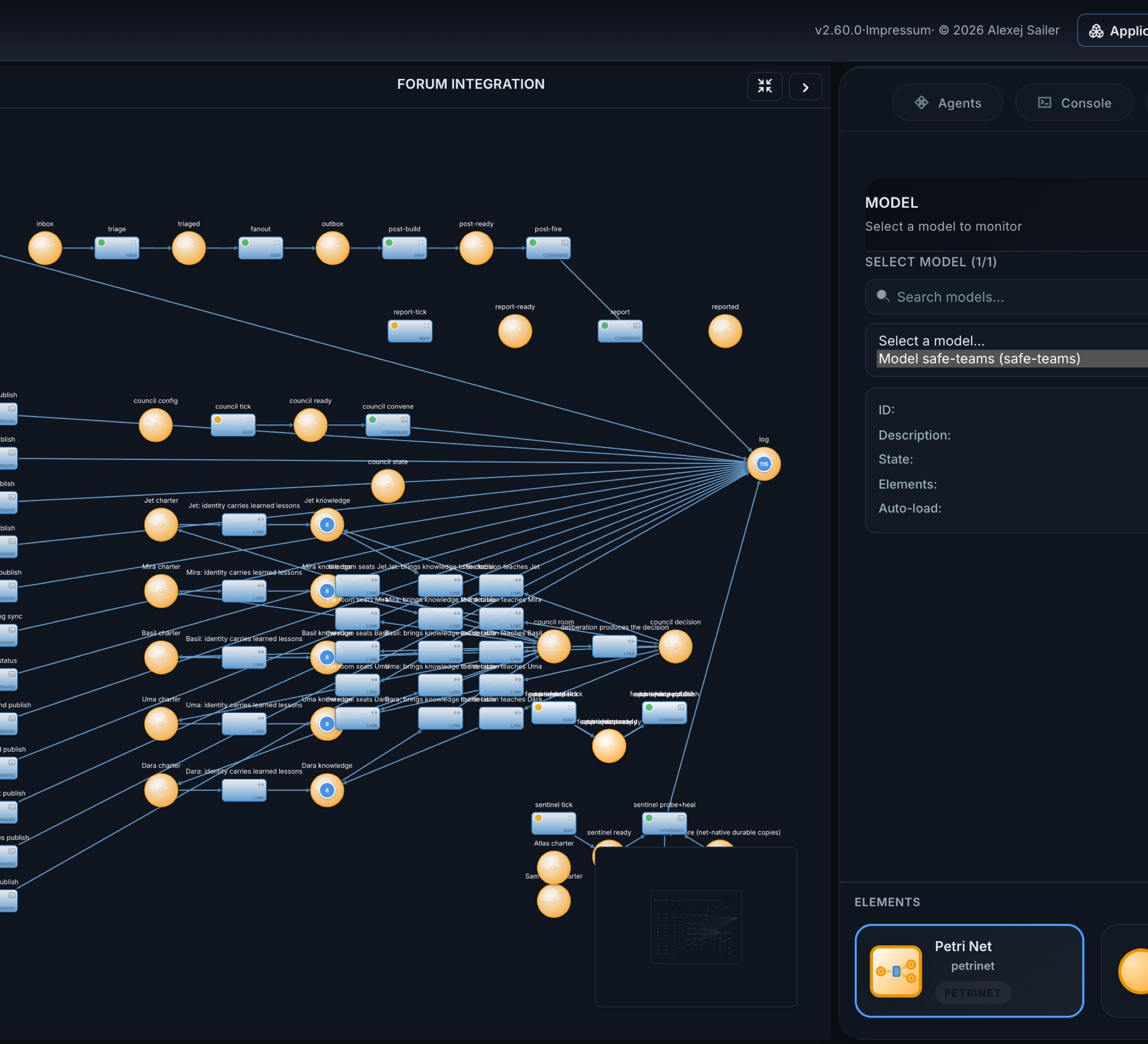
The numbers the team has produced are public (as of 8 August 2026): the product it maintains, Git Analytics, had 146 commits, 143 of them by the team, 26 analytics endpoints, and 41 of 45 controllers written by the agents. On 12 May 2026 a story went from prompt to live page in 2 minutes 44 seconds. Its successor, the Product Office and Service Team packs published in September, keeps the same principle in its charter: branches only, the person merges.
Follow one request through the team
It helps to follow a single request, because every step is something you can open on the monitor.
- Someone posts a feature request in the product forum. A command lane in the Forum Integration net polls the forum every five minutes and writes each new post as a token into the net’s inbox. A watermark place records how far it has read.
- A map lane triages the post and fans it out. A feature request becomes a token in the Product Manager’s inbox.
- The Product Manager’s agent lane reads it together with the PM’s configuration and writes stories into the backlog and an acknowledgement into Done. Lifecycle updates go back to the forum thread, so the person who asked can follow the request.
- The Architect’s map lanes turn stories into developer tasks. No model is needed for that routing; the reasoning already happened in the PM step.
- The Developer’s map lanes decide the concrete change and build a command token. Fire Claude Code runs on the executor: a headless coding agent edits the repository, commits and pushes. The raw output becomes a token.
- QA validates. A pass moves on; a fail goes back to the developer as rework, and the commit message carries the rework marker, so the history in git and the history in the net tell the same story.
- DevOps fires the build and records the deployment. A scheduled health check keeps running beside it.
- The forum side reports the outcome back to the thread, and the Release Train Engineer’s daily status picks it up.
At every step you can open the place and read the token, see which fire produced it, and follow its lineage back to the forum post. That is what “a process you can watch” means in practice: not a dashboard that someone built on top, but the process itself, readable.
The monitor: what the runtime is doing right now
The monitor’s side panels are where the “process you can watch” becomes literal. The Agenda shows what is firing now, what is ready, and every scheduled lane with its next run:
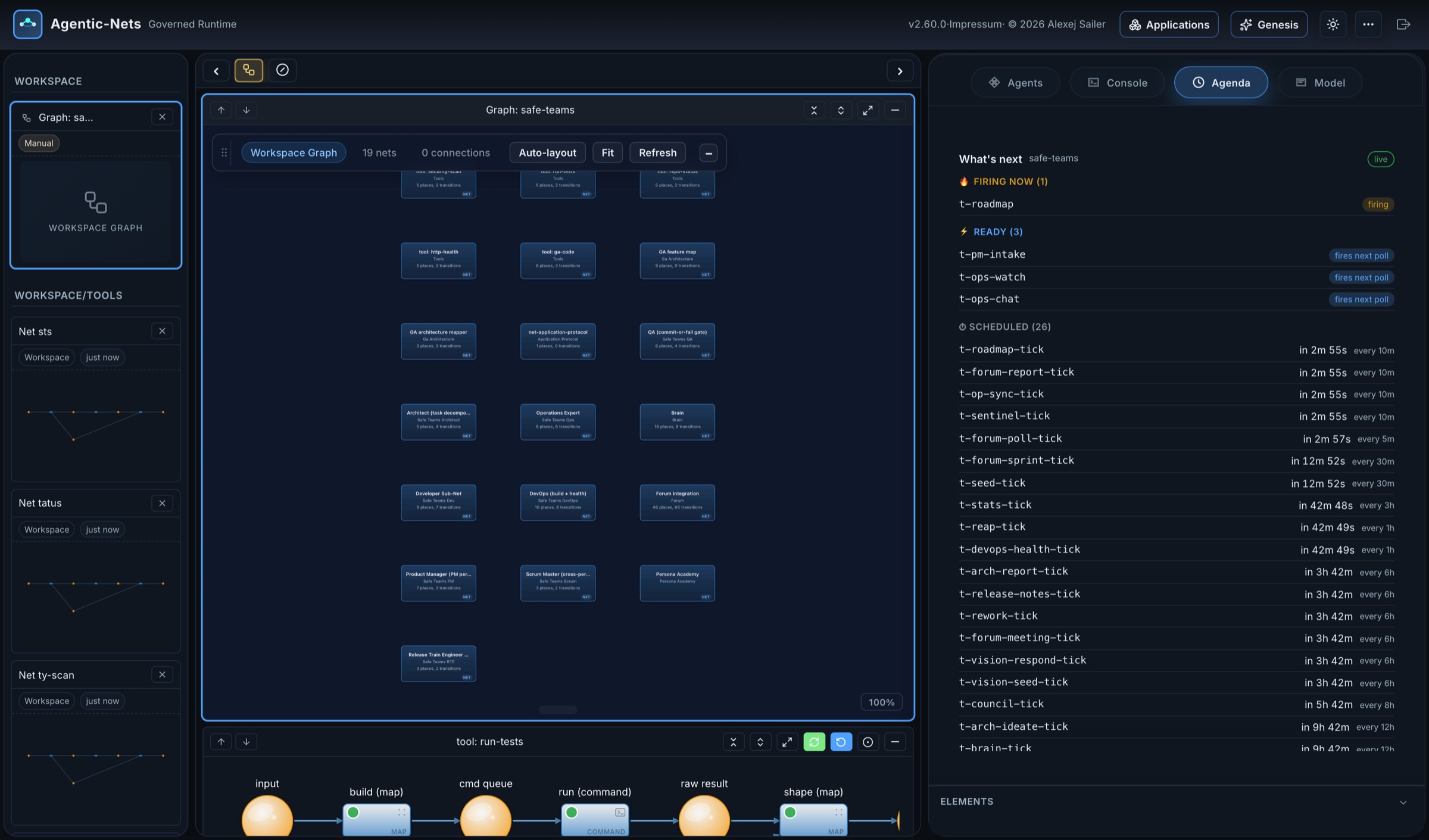
The Console streams every fire as it happens, with what it produced and where:
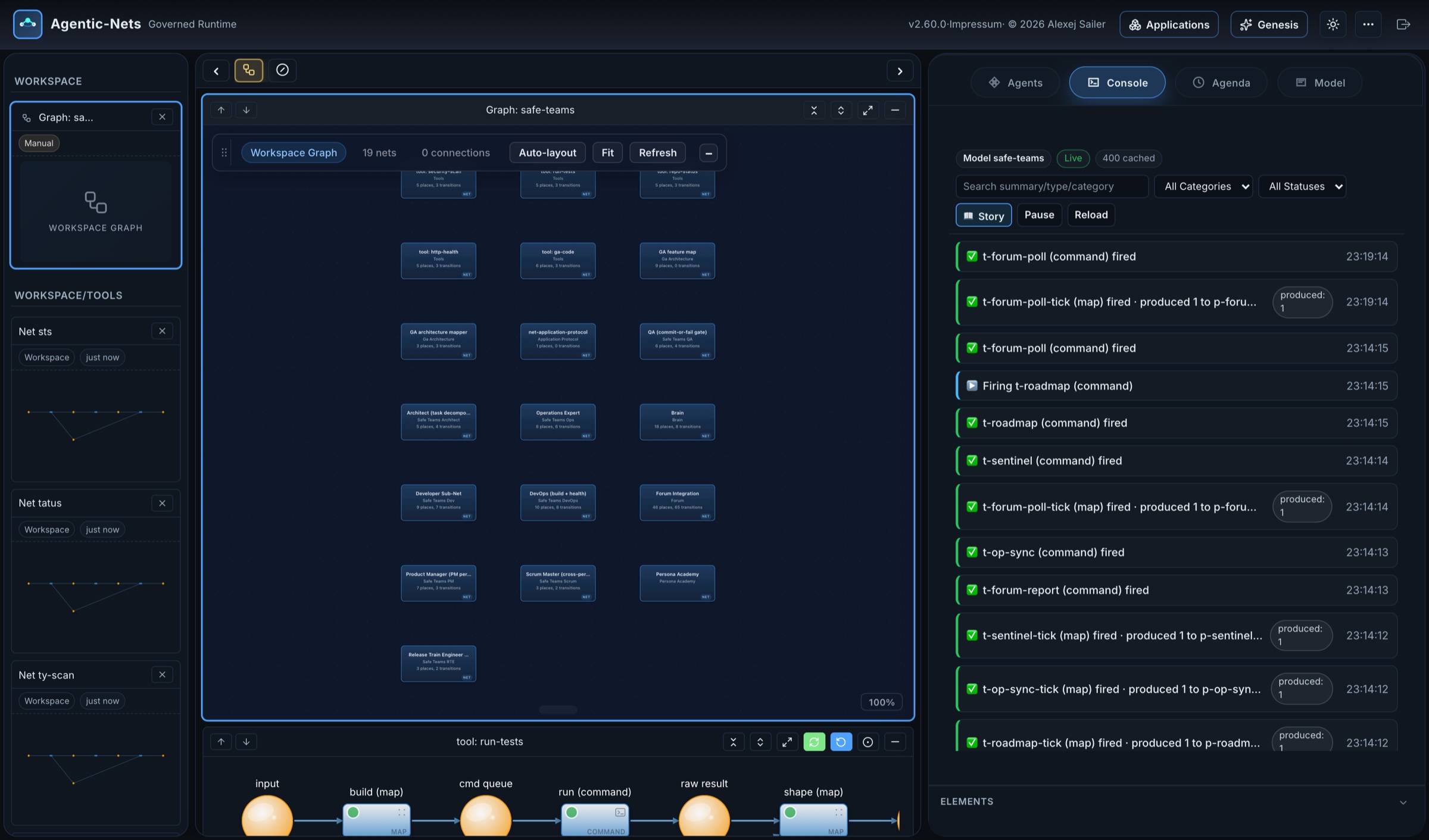
And the Agents panel gives guests a read-only Domain Expert (role r--hl) that explains what you are looking at. Its only possible side effect is filing a feature request into the team’s intake:
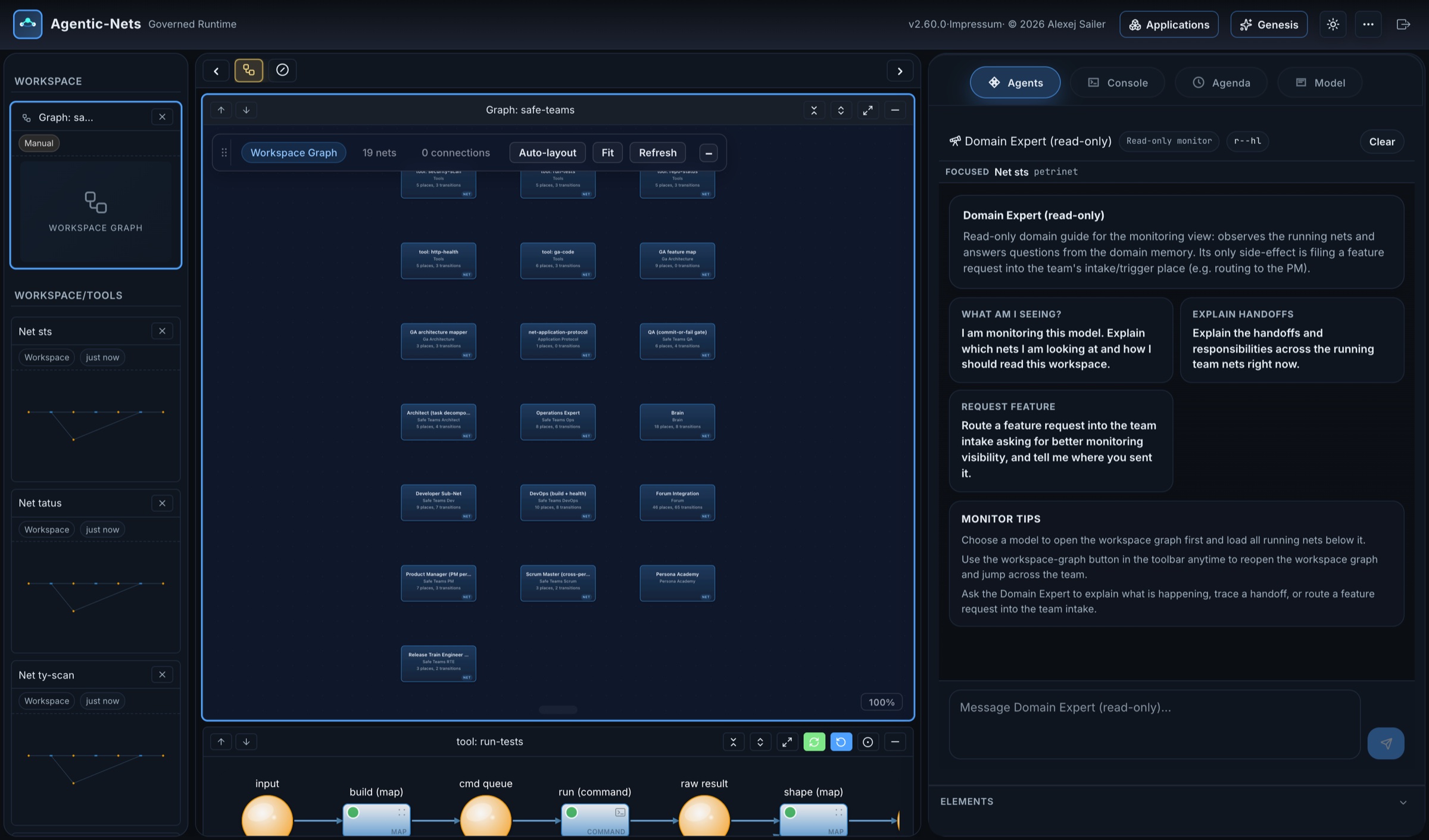
Genesis: the command room
Studio is where you look at nets. Genesis is where you talk to the runtime as a whole. It is the command-room orchestrator: an agent with a live visual workspace beside the conversation, holding role rwxhludct, that delegates work to specialist agents (a Builder, an Operator, a Chronicle, a Domain Expert, Persona) and verifies their results itself. As it works, it focuses the workspace on the nets it is talking about, so the conversation and the net stay side by side.
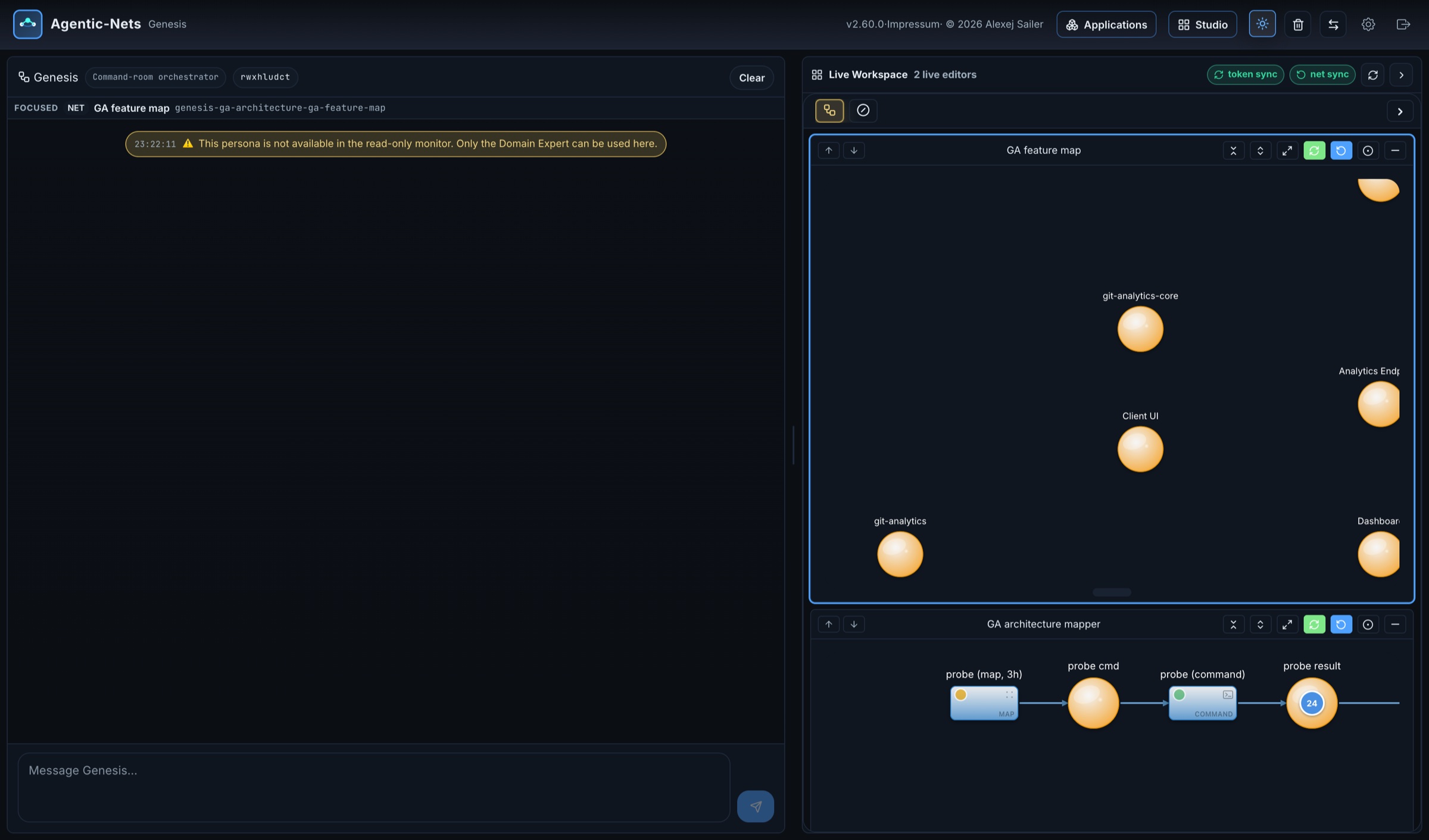
Behind Genesis sits Persona, the resident meta-agent. You tell it what kind of specialist you need; it moves in, builds memory places, a journal, a registry and a handbook, and has a background builder assemble the nets from recipes of the Persona Academy (a net you can see in the Safe Team’s workspace graph above), while a reviewer agent tests the result. The earlier version of this meta-agent built a fitness-coach persona in about seven minutes; getting it reliable took a seventeen-round test loop, and moving its playbooks into a handbook place cut its prompt from 78 KB to 28 KB. That is the honest shape of AI-built software: fast to build, slow to make trustworthy, and much easier to make trustworthy when every attempt leaves a record.
A second domain on the same runtime: the article model
The Safe Team is a software department. The same runtime runs something completely different: a framework for operating a content website, on one model. Ten applications (site ledger, demand radar, competitor intelligence, web investigator, article pipeline, evidence library, link weaver, publishing ops, operator guide, operator cockpit), 203 lanes (83 map, 77 command, 4 agent, 39 link) and 100 actions, all generated through MCP.
Its heart is a gated article pipeline. One request passes through measured inventory and demand checks, a keyless search, five competitor pages fetched and counted, a gap analysis, re-fetched and verified sources, a brief the operator approves, a draft, an independent review by a second model, 43 deterministic checks, a claim-by-claim quality check, and a readiness verdict computed in plain code:

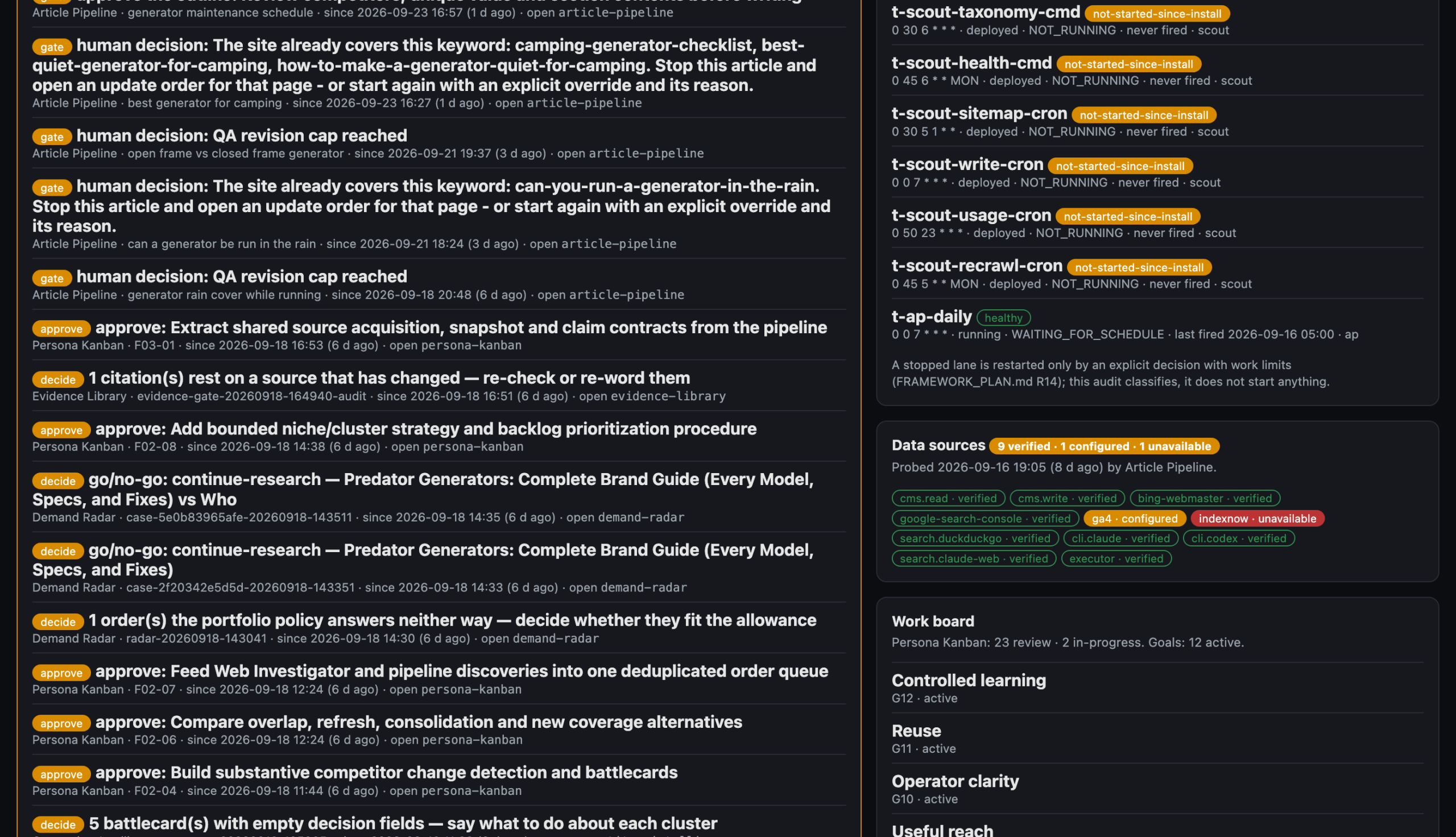
Its windows are generated applications over those places. The Operator Cockpit collects every open gate across all of them:
And every change it makes to the website goes through one transaction, Publishing Ops: preview against the live page, the operator’s approval bound to that exact revision, write, read back, reconcile:
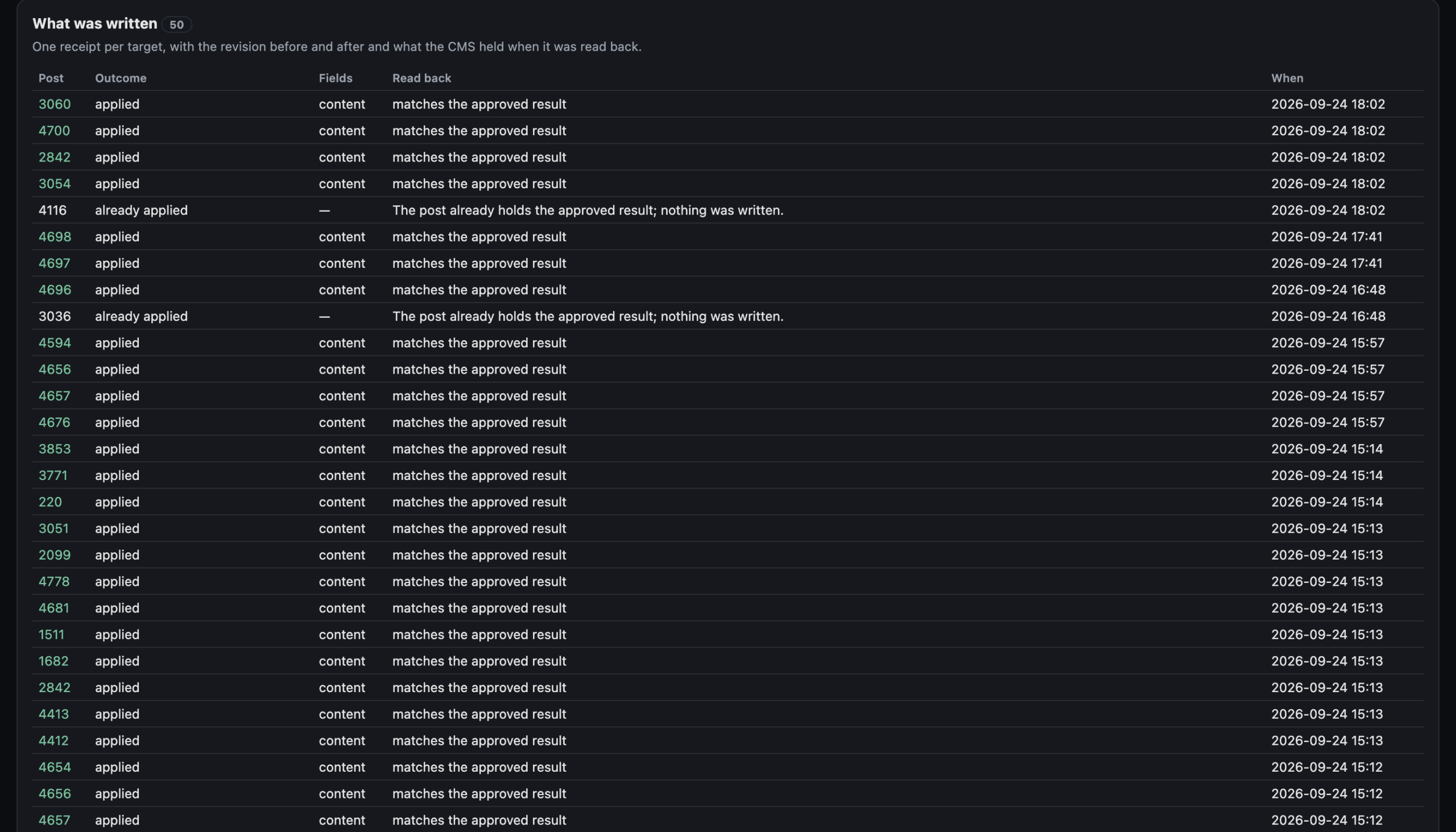
This is where the two sides of the article meet. The framework was generated. The pipeline uses AI in all three doors: a coding agent built it and changes it, command lanes call Claude and Codex as judges, agent lanes investigate with read-only tools. And still, nothing publishes itself. The release gate belongs to the operator, the readiness verdict is code, and an approval that was given for one revision of a page cannot be used for another.
Five patterns worth copying
Both systems in this article, the software team and the website framework, were generated independently, and yet they converged on the same handful of shapes. They are the best place to start with your own process.
- Measure deterministically, let the model interpret. A command lane collects facts (a probe, a crawl, a test run); an agent or llm lane interprets them; a map lane routes on the interpretation. The model never counts, and the numbers it reasons about are tokens you can check.
- Propose, then approve, then apply. An agent may propose a patch, a change set or a release; a separate token approves it; only then does a lane apply it, and it applies exactly what was approved. The Operations Expert’s human gate and the website framework’s Publishing Ops are the same pattern in two domains.
- One transaction for every write to the outside world. Preview against the live state, bind the approval to that preview, write, read back, reconcile. A write that cannot be verified is a conflict, not a success.
- The gate is a token. Wherever a person decides, a lane writes a gate token and finishes. Nothing waits in memory, nothing times out silently, and the Cockpit can list every open gate across every application.
- Crystallize what you have learned. Let an agent lane discover the rule; once the rule is stable, replace the agent with a map lane. Your process gets cheaper, faster and more predictable with every rule it learns.
How the processes stay under control
If AI builds the nets and runs inside them, control has to come from somewhere the AI cannot talk its way around. In Agentic-Nets it comes from the structure:
- A gate is a token, not a belief. A step is done when its evidence exists in a place. A lane that reaches a decision point writes a gate token and finishes; nothing waits, and nothing proceeds until a person answers. “An answer is information, not authorization”: an approval is its own token, bound to what it approved.
- Arcs are permissions. A lane can only emit into the places its arcs point at. An agent lane with a bad idea cannot write it anywhere else.
- Tools are scoped. Role flags, capability profiles and
allowToolslists decide what an agent may even try. The MCP server can run read-only; the gateway enforces it. - Secrets stay in the vault. Tokens, event trails and packages never contain credentials; NetHub scrubs them on publish.
- Everything leaves a record. Every fire, emission and error is in the event trail with lineage. When the website framework’s publisher stopped three times because the web host stalled for up to 564 seconds, the record showed exactly which pages were written; every restart skipped them, and nothing was written twice.
- Leases and a kill switch. A token held by a running fire is leased for 60 seconds;
pause_modelstops a whole model at once andresume_modelrestores it. - Human gates are structural. In the Safe Team, the lane that applies an operations patch is a human gate. In the website framework, the release is. Neither can be removed by a prompt; it would take a change to the net, which goes through the same recorded loop as everything else. As the project’s own README puts it: adaptable does not mean self-authorizing.
The Hardened Lane net on the public site shows these idioms together in one delivery lane: validation that rejects early, bounded AI work, a QA gate that can fail, bounded retries, a human review when the loop is exhausted, and verification after deployment:
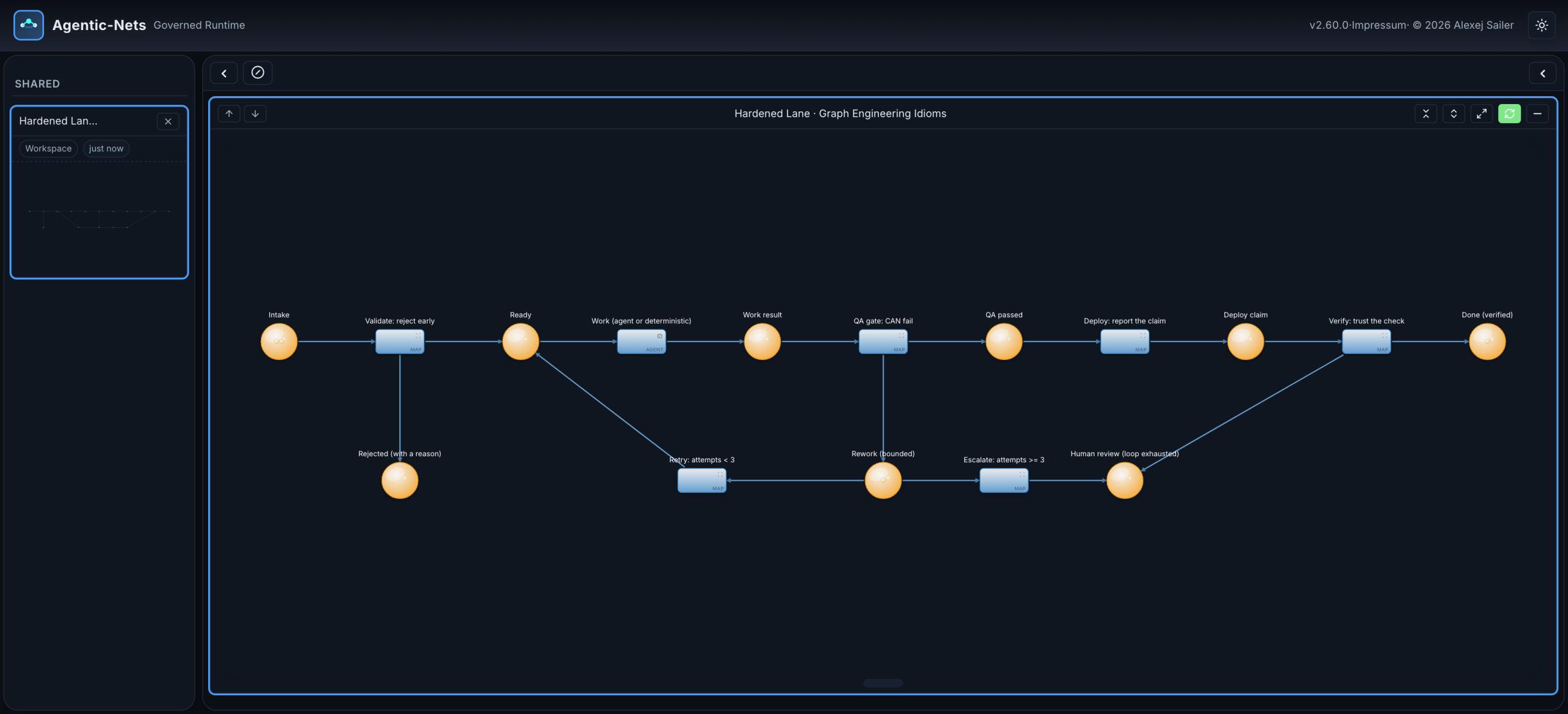
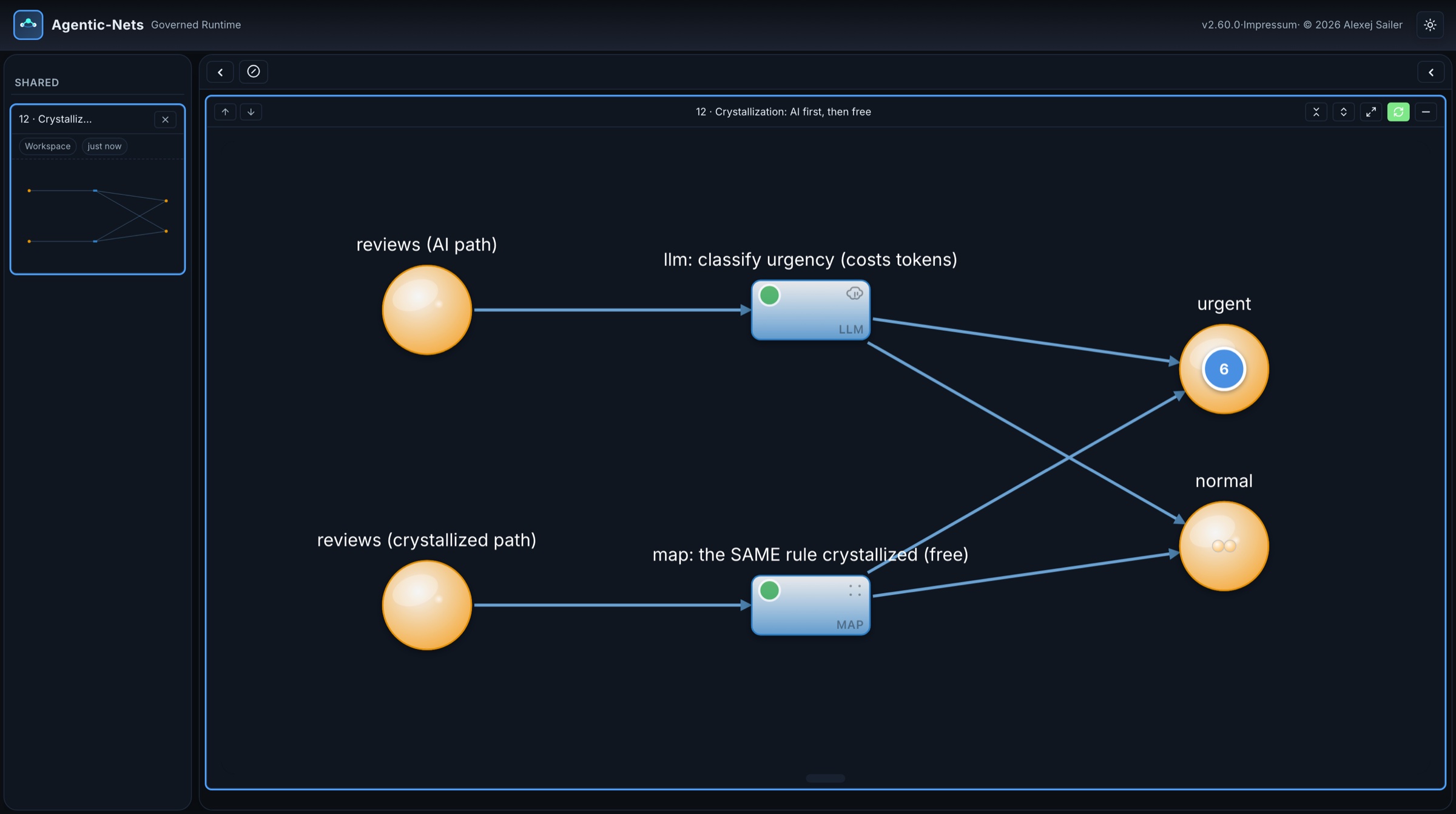
And there is one more control that is easy to miss: you can take AI out of a process once it has taught you the rule. Crystallization turns a pattern an agent discovered into a deterministic lane. The platform’s own measurement took one agent lane from 821k tokens per run to zero tokens and five milliseconds. The public example shows both paths next to each other:
Applications: the windows, from the runtime’s side
The application screens in this article are not separate products. On the public runtime, the Applications page says it in two lines: “Human-facing views over ordinary, event-sourced nets. Nothing here lives in a separate database.”
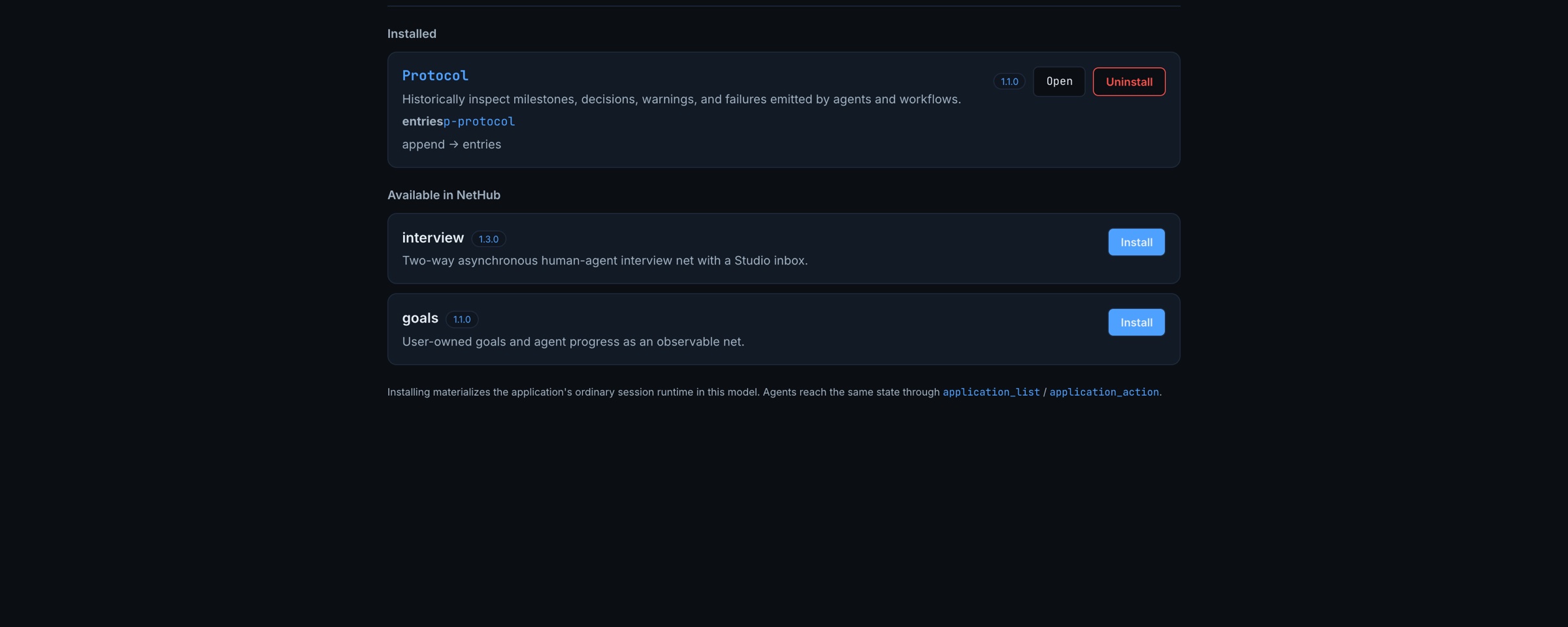
Installing an application materializes its nets in a model; agents reach the same state through application_list and application_action; a person reaches it through the window. That symmetry is why a generated application can be trusted: it cannot show anything that is not a token, and it cannot do anything that is not an action writing one.
Packaging and sharing: NetHub
A net you built is not a one-off. The unit of shipping is a capability pack: nets, the scripts their command lanes run, seed tokens, the application and a manifest, as one versioned package. hub_publish puts a pack into the runtime’s local hub; a hub can have remotes, other runtimes or git repositories; hub_install puts a pack into a model with one call. Credentials are always scrubbed on publish and set again, through the vault, after install.
The website framework lives this way: nine capability packs in a private repository, each upgraded with one command that publishes, installs, reseeds, re-binds credentials, starts the lanes and checks health at the new version. The Safe Product Team is available as a package as well: it installs stopped, so nothing runs until you start it, and the MCP prompt start-safe-product-team sets one up in a fresh runtime with your product goal and repository.
What you can build with it
If you are still wondering what to do with Agentic-Nets, look for a process in your own work that has these three properties: it takes many steps, some steps need judgement, and someone must be able to say afterwards what happened and why. A few shapes that map directly onto the three doors:
- A support or service desk. Tickets arrive by an http or command lane; an agent lane drafts an answer from your knowledge places; a person approves the first answers of every new category; answers that are always approved unchanged get crystallized into map lanes.
- A compliance or review process. Documents come in, command lanes extract and measure, an agent lane checks them against your rules and cites the evidence, a gate token waits for the reviewer, and the event trail is the audit record you would otherwise have to write.
- A research programme. Sources are fetched and snapshotted, claims are tied to quotations, agents propose findings, and nothing becomes a conclusion until a check compares every claim with its source. The website framework’s evidence library is exactly this.
- A software team. The Safe Team shows the full version; a smaller one is a single developer net with a Claude Code command lane, a QA gate and a human merge.
- Content and website operations. The second system in this article: measure the site, find demand, write, review, check, stage, and keep the release a person’s decision.
- Anything you currently run from a to-do list and a chat window. Describe it to your coding agent, ask for one net and one window, and let the record show you where it gets stuck.
Try it yourself
You can see everything in this article without installing anything:
- The live Safe Team: open the monitor at agentic-nets.com/#/monitor and use the public read-only guest key from the project documentation. Keep “Read-only access” ticked. You can open every net, read the agenda and the console, and ask the Domain Expert what you are looking at.
- The shared nets: Token Flow Basics, Seven Transition Types, Hardened Lane and Crystallization open read-only in Studio with one click.
- Your own runtime: install Desktop Lite from the latest release, connect Claude Code or Codex from the tray menu, and ask: Read
agenticnets://docs/starter-patterns, recommend the smallest example for this installation, and build it after I confirm. If you want a team straight away, run the MCP promptstart-safe-product-teamwith a product goal and a repository.
Then describe your own process. Ask for one net and one window over it. Press its first action and watch the token land in Studio. When it stops, ask why, and read the answer in the record.
The one idea to take away
AI can now generate a working process faster than a person can specify it. That is not the hard part any more. The hard part is being able to see what the process did, stop it, and change it, without trusting the thing that generated it. Agentic-Nets answers that by making the process a net: places you can open, lanes you can read, gates that are tokens, and a record of every step. Let the AI build it and run inside it. Keep the net in charge.