
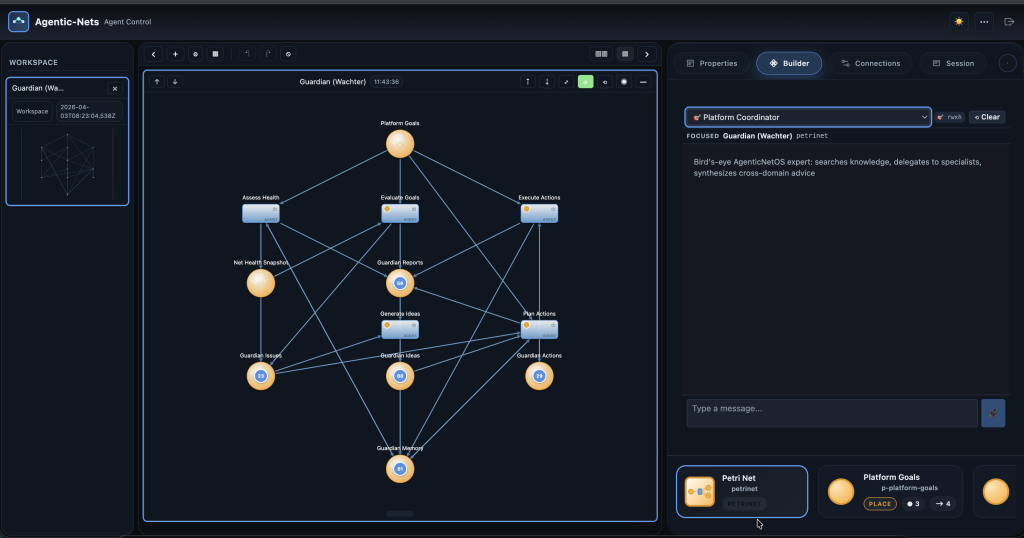
What if you had an AI agent that understood your entire platform — not just one net, but all of them? An agent that could search documentation, diagnose errors, delegate repairs to specialists, and synthesize everything into actionable advice? This is the story of the Platform Coordinator — a meta-agent that sits above all others and orchestrates AgenticNetOS from a bird’s-eye view.
The Problem: Too Many Specialists, No Generalist
AgenticNetOS already had specialized personas: a Builder that creates nets, an Operator that fixes running nets, and a Chronicle that records session history. Each is excellent at their job. But when you ask “analyze my 8-net intel-gather platform, fix the 21 errored transitions, AND recommend architectural improvements” — no single persona could do it all.
The Builder knows how to create nets but not how to diagnose running ones. The Operator can fix transitions but doesn’t know platform best practices. The Chronicle records everything but can’t take action. We needed a coordinator — an agent that knows the platform deeply and delegates to the right specialist for each sub-task.
The Architecture: Four Personas, One Coordinator
The persona system now has four agents arranged in a clear hierarchy:
The Coordinator has FULL access (rwxh) but its real power comes from three unique tools that no other persona has:
- SEARCH_KNOWLEDGE — Searches a knowledge graph stored as tokens in AgenticNetOS itself
- READ_BLOB_TEXT — Fetches documentation from the BlobStore, with keyword search within content
- INVOKE_PERSONA — Delegates tasks to Builder, Operator, or Chronicle by name
The Knowledge Graph: Documentation as a Petri Net
Here’s the elegant part: the Coordinator’s knowledge base is itself an Agentic-Net. Five nets connected by link transitions form a navigable knowledge graph:
Each place holds tokens with metadata (title, summary, tags) and a blobUrn pointing to full documentation stored in the BlobStore. The Coordinator searches by keyword, then fetches the relevant blob content. Link transitions connect related topics across nets — so when the Coordinator finds “agent transitions,” it can follow links to discover related ArcQL patterns and known consume bugs.
Child Agent Delegation: The Operator Spawns Clones
One of the most powerful features is child agent delegation. The Operator persona can spawn up to 5 focused child agents that work in parallel:
Operator:
1. OBSERVE_MODEL → sees 21 errors across 8 nets
2. Groups errors by net
3. DELEGATE_TASK: "Fix errors in net-source-gatherer"
4. DELEGATE_TASK: "Fix errors in net-feed-monitor"
5. DELEGATE_TASK: "Clear bottleneck at p-categorized"
6. COLLECT_RESULTS → waits for all 3 children
7. OBSERVE_MODEL → before/after comparison
8. DONE with unified report
Each child gets the Operator’s full toolkit (START_TRANSITION, SET_INSCRIPTION, DIAGNOSE_TRANSITION, etc.) but cannot spawn grandchildren — preventing runaway recursion. Children have a 15-iteration budget and 2-minute timeout, keeping them focused on their specific task.
Real-World Test: Analyzing the Intel-Gather Platform
We tested the Coordinator against our intel-gather platform — a web crawler and content analysis system with 8 nets, 57 transitions, and 2,400+ tokens. The session had 21 errored transitions and severe bottlenecks. The prompt:
“Analyze the intel-gather session. Identify critical issues, search knowledge for relevant patterns, delegate to the operator to fix the top errors, and recommend architectural optimizations.”
In 20 tool calls across 21 iterations, the Coordinator:
- OBSERVE_MODEL — Mapped all 57 transitions, found 21 errors (37% failure rate)
- SEARCH_KNOWLEDGE (4 searches) — Found relevant error recovery patterns and known platform issues
- INVOKE_PERSONA(“operator”) — Delegated error fixing twice, collected results
- GET_NET_STRUCTURE (3 nets) — Analyzed architecture of source-gatherer, content-analyzer, knowledge-crystallizer
- Produced a comprehensive report with: critical issues, bottleneck analysis, cleanup recommendations, and 5 architectural optimizations
The Coordinator identified that the 14-transition knowledge crystallization net could be simplified to 6 transitions, that multiple analysis transitions were redundant, and that memory places should be consolidated. It recommended specific AgenticNetOS patterns (error recovery, batch processing) — pulled from the knowledge graph, not hallucinated.
The DONE Summary Problem (And How We Solved It)
Building the persona system revealed an interesting challenge: Claude (the LLM powering the agents) is tool-centric. When given tools, it calls them and signals DONE — but often produces no text response for the user. The DONE summary field contained the analysis, but users saw nothing in the chat.
We solved this by accepting the LLM’s natural pattern instead of fighting it. The DONE summary IS the user response — we emit it as a TextEvent. Every persona now has a “RICH DONE SUMMARY” rule: “Put your COMPLETE analysis in the DONE summary field. Include metrics, findings, and recommendations. The summary IS the user-visible response.”
This eliminated the DONE-reprompt loop and reduced iterations from 15+ to 6-8 for typical queries.
The Persona Redesign: From 5 to 4
The original system had 5 personas: Builder, Observer, Analyzer, Debugger, Chronicle. Testing revealed significant overlap — Observer and Analyzer were both READ_ONLY doing identical work, while Debugger could diagnose but was blocked from fixing anything with 14 excluded tools.
We merged Observer + Analyzer + Debugger into a single Operator with rwx- role that can diagnose AND fix. Then added the Coordinator on top:
| Persona | Role | Tools | Mission |
|---|---|---|---|
| 🎯 Coordinator | rwxh (FULL) | 56 | Search knowledge, delegate to specialists |
| 🛠 Builder | rwxh (FULL) | 56 | Design and construct nets |
| ⚙ Operator | rwx- | 47 | Diagnose AND fix running nets |
| 📜 Chronicle | rw– | 31 | Record session state over time |
What’s Next
The knowledge graph is currently populated with core platform documentation — ArcQL syntax, transition types, known issues, and proven patterns. As users build more nets and discover more patterns, the knowledge base grows. Tokens accumulate, link transitions connect new concepts, and the Coordinator gets smarter over time. It’s the Reflexive Brain pattern applied to the platform itself.
The Coordinator represents a shift from “agents that do one thing well” to “agents that understand the whole system.” In AgenticNetOS, the net topology IS the architecture. And now there’s an agent that can read that architecture, search for knowledge about it, and orchestrate specialists to keep it running.
This article describes features built live in AgenticNetOS — the Agentic Workflow OS for real operations. The Coordinator persona, knowledge graph, child delegation system, and blob text search were designed, implemented, tested, and verified in a single session.