
Meta-Petri Nets – Building Nets That Create Other Nets
What if a Petri net could create other Petri nets? In this article, I’ll show how to build a Meta-Petri Net using Agentic Nets – an agentic process that reads a task description and automatically generates a complete Petri net using Claude Code and the petri-net-agentic process-builder agent.
This is a powerful example of reflexive automation: the same Petri net runtime that executes agentic processes can be used to create new agentic processes dynamically.
The Meta-Petri Net Architecture

The Meta-Petri Net contains six places and two transitions:
- Places:
- Task – incoming task descriptions (e.g.,
{"description": "Create a Hello World agentic process"}). - PNML Config – target net configuration (modelId, sessionId, batchEndpoint).
- Context – lessons learned and patterns (read-only, never consumed).
- Tools – API documentation (read-only, never consumed).
- Command – intermediate CommandToken ready for execution.
- Result – execution results from Claude Code.
- Task – incoming task descriptions (e.g.,
- Transitions:
- t-build-cmd – a MAP transition that builds a comprehensive Claude Code command from all inputs.
- t-execute – a COMMAND transition that executes the bash command via Claude Code.
The flow looks like this:
[Task]    ──┐
[PNML]    ──┼──→ (Build Command) ──→ [Command] ──→ (Execute Claude) ──→ [Result]
[Context] ──┤
[Tools]   ──┘
Let’s look at both transitions in detail.
Two Implementation Approaches
We’ve implemented two versions of the Meta-Petri Net, each with different trade-offs:
1. MAP Version (Deterministic)
Net ID: 2025-12-25T13-04-42
[Task]    ──┐
[PNML]    ──┼──→ (t-build-cmd MAP) ──→ [Command] ──→ (t-execute CMD) ──→ [Result]
[Context] ──┤
[Tools] ──┘- 6 places: Task, PNML Config, Context, Tools, Command, Result
- 2 transitions: t-build-cmd (MAP), t-execute (COMMAND)
- Behavior: Template-based command construction – same inputs always produce the same command
- Best for: Production environments where predictability and auditability are critical
2. AGENT Version (Adaptive)
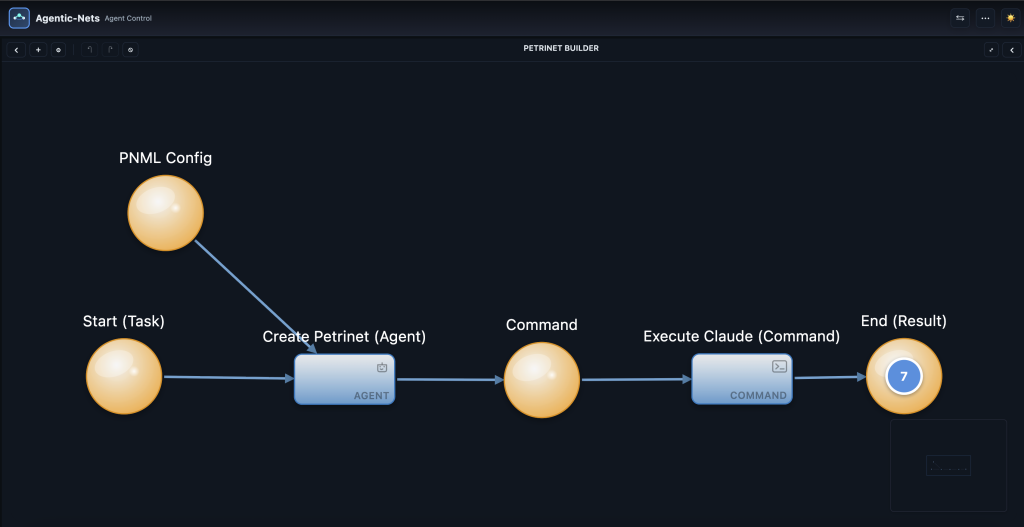
Net ID: 2025-12-25T13-02-29
[Start/Task] ──┬──→ (Create Petrinet AGENT) ──→ [Command] ──→ (Execute Claude CMD) ──→ [End/Result]
[PNML Config] ─┘- 4 places: Start (Task), PNML Config, Command, End (Result)
- 2 transitions: Create Petrinet (AGENT), Execute Claude (COMMAND)
- Behavior: AI-driven command construction – the agent dynamically interprets inputs and adapts its approach
- Best for: Exploratory scenarios where flexibility and creative problem-solving are valued
When to Use Which?
| Aspect | MAP Version | AGENT Version |
|---|---|---|
| Determinism | High – same inputs = same output | Variable – AI may interpret differently |
| Debuggability | Easy – template is explicit | Harder – AI reasoning is opaque |
| Flexibility | Limited to template structure | High – can adapt to novel inputs |
| Context Handling | Explicit read-only presets | Agent discovers context from NL |
| Token Count | 6 places + context tokens | 4 places (simpler structure) |
This article focuses on the MAP version since it demonstrates the explicit template interpolation pattern. The AGENT version is covered in a separate article on Agent transitions.
MAP transition: “t-build-cmd”
The first stage takes four inputs and builds a comprehensive Claude Code command. Here’s the inscription:
{
  "id": "t-build-cmd",
  "kind": "map",

  "presets": {
    "task": {
      "placeId": "p-task",
      "host": "default@localhost:8080",
      "arcql": "FROM $ LIMIT 1",
      "take": "FIRST",
      "consume": true
    },
    "pnml": {
      "placeId": "p-pnml",
      "host": "default@localhost:8080",
      "arcql": "FROM $ LIMIT 1",
      "take": "FIRST",
      "consume": true
    },
    "context": {
      "placeId": "p-context",
      "host": "default@localhost:8080",
      "arcql": "FROM $ LIMIT 1",
      "take": "FIRST",
      "consume": false
    },
    "tools": {
      "placeId": "p-tools",
      "host": "default@localhost:8080",
      "arcql": "FROM $ LIMIT 1",
      "take": "FIRST",
      "consume": false
    }
  },

  "postsets": {
    "command": {
      "placeId": "p-command",
      "host": "default@localhost:8080"
    }
  },

  "action": {
    "type": "map",
    "template": {
      "kind": "command",
      "id": "pn-${task._meta.id}",
      "executor": "bash",
      "command": "exec",
      "args": {
        "command": "claude -p 'Create Petri net for: ${task.data.description}. Target: modelId=${pnml.data.modelId}, sessionId=${pnml.data.sessionId}, batchEndpoint=${pnml.data.batchEndpoint}. Context: ${context.data.prompt}. Tools: ${tools.data.prompt}. Use petri-net-agentic process-builder agent via Task tool.' --allowedTools 'Task,Bash' --dangerously-skip-permissions --no-session-persistence < /dev/null",
        "workingDir": "/Users/alexejsailer/Developer/AgenticOS",
        "timeoutMs": 600000
      },
      "expect": "text"
    }
  },

  "emit": [{"to": "command", "from": "@response", "when": "success"}],
  "mode": "SINGLE"
}
Four inputs, one comprehensive command
The key insight is how the MAP transition combines four different data sources:
${task.data.description}– the actual task to perform${pnml.data.modelId},${pnml.data.sessionId},${pnml.data.batchEndpoint}– where to create the new net${context.data.prompt}– accumulated lessons and patterns${tools.data.prompt}– API documentation
Notice that Task and PNML are consumed (removed after reading), while Context and Tools remain in place – they’re reference data that can be reused across multiple executions.
The CommandToken structure
The template produces a CommandToken – a structured object that tells the COMMAND transition exactly how to execute:
{
  "kind": "command",
  "id": "pn-abc123...",
  "executor": "bash",
  "command": "exec",
  "args": {
    "command": "claude -p '...' --allowedTools 'Task,Bash' ...",
    "workingDir": "/path/to/agenticos",
    "timeoutMs": 600000
  },
  "expect": "text"
}
COMMAND transition: “t-execute”
The second stage reads the CommandToken and executes it via the agentic-net-executor service:
{
  "id": "t-execute",
  "kind": "command",

  "presets": {
    "input": {
      "placeId": "p-command",
      "host": "default@localhost:8080",
      "arcql": "FROM $ WHERE $.kind==\"command\" LIMIT 1",
      "take": "FIRST",
      "consume": true
    }
  },

  "postsets": {
    "result": {
      "placeId": "p-result",
      "host": "default@localhost:8080"
    }
  },

  "action": {
    "type": "command",
    "inputPlace": "input",
    "groupBy": "executor",
    "dispatch": [{"executor": "bash", "channel": "default"}],
    "await": "ALL",
    "timeoutMs": 600000
  },

  "emit": [{"to": "result", "from": "@response", "when": "success"}],
  "mode": "SINGLE"
}
The COMMAND transition:
- Reads the CommandToken from p-command
- Dispatches it to the bash executor
- Waits for Claude Code to complete (up to 10 minutes)
- Emits the result to p-result
Context tokens: accumulated knowledge
One of the most powerful aspects of this design is the Context place. It contains lessons learned from previous executions:
{
  "prompt": "CRITICAL RULES: 1) ALWAYS use the EXACT netId from PNML config in batch calls - NEVER create a new net. 2) Design-Time API port 8082 for visual PNML. 3) Events API port 8080 for runtime. 4) Claude Code needs --allowedTools Task,Bash --dangerously-skip-permissions --no-session-persistence < /dev/null. 5) Use petri-net-agentic process-builder agent. 6) ArcQL uses == not =. 7) Host format modelId@hostname:port."
}
This is Arcon in action – documentation that drives execution. When we discovered that Claude was creating new nets instead of adding to existing ones, we added a lesson to the Context token. The next execution immediately used this knowledge.
The complete flow in action
Here’s what happens when we add tokens to create a simple Hello World agentic process:
1. Task token (p-task):
{"description": "Create a simple Hello World agentic process with Start, Greet, and End places"}2. PNML token (p-pnml):
{
  "modelId": "default",
  "sessionId": "test-session-001",
  "batchEndpoint": "http://localhost:8082/api/workspace/default/test-session-001/batch"
}
3. After t-build-cmd – CommandToken created with comprehensive prompt containing task, config, context, and tools.
4. After t-execute – Claude Code runs, uses the petri-net-agentic process-builder agent, and creates:
The Hello World Petri net has been created successfully.

**Structure:**
[Start] → (Begin) → [Greet] → (Complete) → [End]
 1 token

**Places:** Start (100, 150), Greet (300, 150), End (500, 150)
**Transitions:** Begin (200, 150), Complete (400, 150)
**Arcs:** 4 arcs connecting the flow
Learning from mistakes: the netId lesson
During development, we discovered an interesting problem. When asked to add elements to an existing net, Claude was creating new nets instead.
The solution? Add a lesson to the Context token:
"ALWAYS use the EXACT netId from PNML config in batch calls - NEVER create a new net."After updating the Context token, the next execution worked correctly – adding a transition to the existing net:
| Task | Result | Location |
|---|---|---|
| Add place “my-place” | ✅ Created | 2025-12-25T13-53-30 |
| Add transition “t-process” | ✅ Created | 2025-12-25T13-53-30 (same net!) |
This is the reflexive learning loop in action: execution reveals issues → lessons added to Context → next execution uses that knowledge.
MAP + COMMAND: a powerful pattern
The Meta-Petri Net demonstrates a reusable pattern:
- MAP transitions – combine multiple inputs into structured commands using template interpolation.
- COMMAND transitions – execute shell commands via the agentic-net-executor service.
- Read-only context – reference data that persists across executions without being consumed.
- Claude Code integration – AI-powered execution with access to specialized agents.
This pattern can be adapted for many use cases:
- Code generation – task + templates + style guide → generated code.
- Infrastructure provisioning – requirements + cloud config + best practices → terraform scripts.
- Document processing – input docs + transformation rules + output format → processed documents.
Building with Claude Code
The entire Meta-Petri Net was built using Claude Code. The process included:
- Creating the visual PNML (6 places, 2 transitions, 7 arcs) via the Workspace API.
- Setting up runtime places and transitions via the Events API.
- Defining the MAP inscription with four presets and comprehensive template.
- Registering the COMMAND transition on the executor service.
- Creating initial Context and Tools tokens with AgenticOS documentation.
- Testing and debugging until the flow worked correctly.
- Adding lessons to Context when issues were discovered.
The result is a working Meta-Petri Net that can create other Petri nets from natural language descriptions – a powerful demonstration of Agentic Nets creating more Agentic Nets.
Choosing Between MAP and AGENT
Both versions of the Meta-Petri Net are production-ready. The choice depends on your use case:
- Use the MAP version (
2025-12-25T13-04-42) when you need deterministic, auditable command construction. The explicit template makes it easy to understand exactly what Claude Code will receive. - Use the AGENT version (
2025-12-25T13-02-29) when you want the AI to dynamically interpret inputs and adapt its approach. This is more flexible but less predictable.
Both versions share the same COMMAND transition for Claude Code execution – only the first stage differs.
In upcoming posts, I’ll explore the AGENT version in detail and show how to combine both patterns for sophisticated AI-driven agentic processes.