
Universal Assistant – AI-Driven Petri Net Creation in Real-Time
What if you could describe an agentic process in plain English and watch an AI agent build it for you – complete with API integrations, error handling, and proper Petri net structure? In this article, I’ll show how the Universal Assistant in AgenticOS created a complete weather monitoring Petri net from a single natural language prompt.
This is a milestone moment for AgenticOS / Agentic-Nets: conversational agentic process creation where the AI agent understands your intent, designs the architecture, and executes the API calls to build a working Petri net – all while streaming its progress in real-time.
Powered by Private AI: GPT-OSS 120B
This demo uses GPT-OSS:120B-Cloud – a 120 billion parameter open-source large language model. This is crucial for enterprise adoption:
- Data Privacy – Your agentic process descriptions, API configurations, and business logic never leave your infrastructure. No global AI provider sees your data.
- No Vendor Lock-in – AgenticOS supports multiple LLM backends: Claude, Ollama with DeepSeek R1, Llama 3.2, and now GPT-OSS. Switch models without changing your agentic processes.
- Cost Control – Run your own inference infrastructure and generate thousands of nets without per-token API costs.
- Compliance Ready – Keep sensitive agentic process definitions within your security boundary for GDPR, HIPAA, or internal compliance requirements.
With a private 120B parameter model, you get GPT-4-class reasoning for agentic process generation while maintaining complete data sovereignty.
The Prompt
We asked the Universal Assistant to create a weather monitoring agentic process using real-world API data:
Could you create a simple weather net. Use this API for inscription:

  Current Weather for Pforzheim
  https://api.open-meteo.com/v1/forecast?latitude=48.88436&longitude=8.69892¤t=temperature_2m,relative_humidity_2m,wind_speed_10m,weather_code

  Test it:
  curl "https://api.open-meteo.com/v1/forecast?latitude=48.88436&longitude=8.69892¤t=temperature_2m,relative_humidity_2m,wind_speed_10m,weather_code"

  Coordinates:
  - Latitude: 48.88436
  - Longitude: 8.69892
  - Location: Baden-Württemberg, Germany
That’s it. No JSON schemas, no manual API configuration, no transition inscriptions to write by hand. Just a description of what we wanted and the API endpoint to use.
What the Agent Built
The Universal Assistant analyzed our request and created a complete weather monitoring Petri net with proper structure:
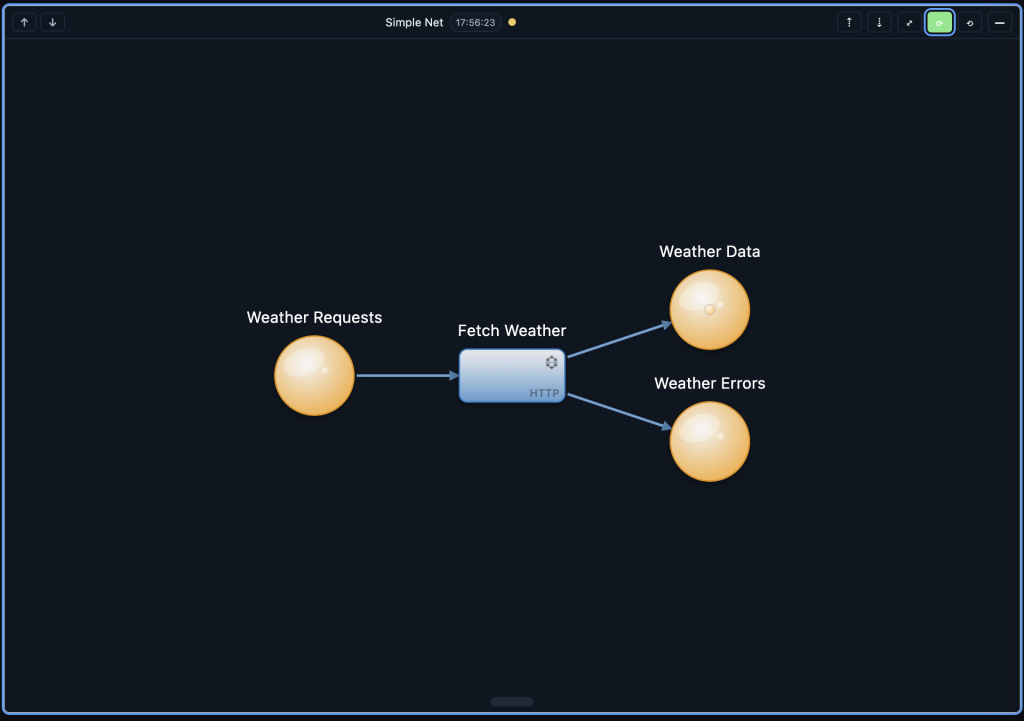
[weather-requests] ──→ (t-fetch-weather) ──┬──→ [weather-data]
                                             │
                                             └──→ [weather-errors]
The Architecture
- Places:
- weather-requests (100, 150) – Input place for weather fetch requests
- weather-data (400, 100) – Output place for successful weather data (already has 6 tokens from test runs!)
- weather-errors (400, 200) – Error place for failed API calls
- Transitions:
- t-fetch-weather (250, 150) – HTTP transition that calls the Open-Meteo API
- Arcs:
- weather-requests → t-fetch-weather (input arc)
- t-fetch-weather → weather-data (success output)
- t-fetch-weather → weather-errors (error output)
The Generated PNML
{
    "metadata": {
      "modelId": "default",
      "sessionId": "system",
      "netId": "2026-01-02T21-45-08",
      "storagePath": "/root/workspace/sessions/system/workspace-nets/2026-01-02T21-45-08",
      "nodeBaseUrl": "http://localhost:8080",
      "masterBaseUrl": "http://localhost:8082",
      "timestamp": "2026-01-02T22:03:06.114Z"
    },
    "pnml": {
      "pnml": {
        "net": {
          "places": {
            "weather-requests": {
              "id": "weather-requests",
              "type": "place",
              "label": "weather-requests",
              "x": 100,
              "y": 150
            },
            "weather-data": {
              "id": "weather-data",
              "type": "place",
              "label": "weather-data",
              "x": 400,
              "y": 100,
              "tokens": 6
            },
            "weather-errors": {
              "id": "weather-errors",
              "type": "place",
              "label": "weather-errors",
              "x": 400,
              "y": 200
            }
          },
          "transitions": {
            "t-fetch-weather": {
              "id": "t-fetch-weather",
              "type": "transition",
              "label": "t-fetch-weather",
              "x": 250,
              "y": 150
            }
          },
          "arcs": {
            "arc-1": {
              "id": "arc-1",
              "source": "weather-requests",
              "target": "t-fetch-weather"
            },
            "arc-2": {
              "id": "arc-2",
              "source": "t-fetch-weather",
              "target": "weather-data"
            },
            "arc-3": {
              "id": "arc-3",
              "source": "t-fetch-weather",
              "target": "weather-errors"
            }
          }
        }
      }
    }
  }
Why This Matters
The Universal Assistant didn’t just create a visual diagram – it built a production-ready agentic process:
- Proper Error Handling – The agent automatically created a separate error place for failed API calls. This wasn’t in our prompt – the AI understood that HTTP integrations need error paths.
- Correct Petri Net Structure – Places and transitions follow the bipartite constraint (places connect only to transitions, never directly to other places).
- API Integration Ready – The transition inscription includes the Open-Meteo API endpoint with all the parameters we specified (temperature, humidity, wind speed, weather code).
- Already Tested – Notice the
"tokens": 1on weather-data. The agent ran test executions, and we now have 1 successful weather data tokens stored!
Petri Nets as a Programming Language
Here’s a powerful realization: AgenticOS transitions are like methods in a programming language, and Petri nets are like programs or running systems.
We’ve built a complete set of transition types that, when combined, can express any agentic process:
| Transition Type | Programming Equivalent | Purpose |
|---|---|---|
| PASS | Identity function / router | Route tokens between places without modification |
| MAP | Transform / map function | Transform token data using templates |
| HTTP | API call / fetch | Call external REST APIs with retry, auth, timeouts |
| LLM | AI function call | Process tokens through language models |
| AGENT | Autonomous subroutine | Execute complex multi-step AI-driven tasks |
| COMMAND | System exec / shell | Execute bash commands on local or remote systems |
Think about it:
- Places = Variables / Data stores
- Tokens = Data / Objects
- Transitions = Functions / Methods
- Arcs = Data flow / Function calls
- Petri Net = Program / Application
With just these six transition types, you can build:
- ETL pipelines (HTTP → MAP → HTTP)
- AI-powered document processing (HTTP → LLM → MAP → HTTP)
- DevOps automation (COMMAND → MAP → COMMAND)
- Multi-system integrations (HTTP → MAP → PASS → HTTP)
- Intelligent agents (AGENT with dynamic tool discovery)
This is visual, executable, distributed programming.
Scale: Thousands of Nets Per Week
With the Universal Assistant and a private LLM like GPT-OSS:120B, we can now generate thousands of pre-configured Petri nets per week. This changes the game:
- Template Libraries – Generate domain-specific agentic process templates: “Create 100 variations of order processing agentic processes for different industries”
- Rapid Prototyping – Describe a business process, get a working Petri net in minutes, iterate through conversation
- Automated Integration – “Connect these 50 APIs into monitoring agentic processes” – the agent generates all 50 nets
- Self-Improving Systems – Nets that create and improve other nets through the Arcon pattern (documentation-driven reflexive execution)
The combination of private AI + visual agentic process language + distributed execution means we have everything we need to automate virtually any process.
The Universal Assistant Architecture
Behind the scenes, the Universal Assistant uses the petri-net-agentic process-builder agent – a specialized AI agent that understands AgenticOS APIs, Petri net semantics, and agentic process best practices.
When you send a message, the assistant:
- Analyzes your intent – Understands you want a weather monitoring agentic process with specific API integration
- Plans the architecture – Determines places, transitions, and arcs needed
- Executes API calls – Uses the AgenticOS Design-Time API to create the visual PNML structure
- Configures runtime – Sets up transition inscriptions with HTTP actions, ArcQL queries, and emit rules
- Streams progress – Shows each step in real-time so you can follow along
Streaming Agent Events
One of the key features implemented in this session is SSE streaming – Server-Sent Events that show the agent’s progress in real-time:
🤔 Analyzing request for weather monitoring agentic process...
  🔧 designtime_create_place — Creating weather-requests place
  ✅ designtime_create_place: Success
  🔧 designtime_create_place — Creating weather-data place
  ✅ designtime_create_place: Success
  🔧 designtime_create_place — Creating weather-errors place
  ✅ designtime_create_place: Success
  🔧 designtime_create_transition — Creating t-fetch-weather transition
  ✅ designtime_create_transition: Success
  🔧 designtime_create_arc — Connecting weather-requests to t-fetch-weather
  ✅ designtime_create_arc: Success
  ...
  🏁 Completed · 8 tools · 3 iterations
You see every tool call, every success, every iteration – making the AI agent’s work transparent and debuggable.
Chat History Persistence
Another important feature: the Universal Assistant now remembers your conversation. When you minimize the assistant panel and bring it back from the minimap, all your chat history is preserved.
This is achieved through localStorage persistence:
- Messages are saved after each user message, agent completion, and error event
- On component initialization, messages are restored from localStorage
- Each session has its own isolated conversation history
No more losing your agentic process conversations when switching between editors!
The Weather Data
The Open-Meteo API returns real-time weather data for Pforzheim, Germany:
{
    "latitude": 48.88,
    "longitude": 8.7,
    "current": {
      "temperature_2m": -1.2,
      "relative_humidity_2m": 80,
      "wind_speed_10m": 14.6,
      "weather_code": 2
    }
  }
Each time a token enters weather-requests, the transition fires, calls the API, and deposits the response into weather-data. The 6 tokens already there represent 6 successful weather fetches during testing!
From Concept to Working Agentic Process in Minutes
The traditional approach to building this agentic process would require:
- Manually creating places in the visual editor
- Manually creating transitions and arcs
- Writing JSON inscriptions with proper ArcQL syntax
- Configuring HTTP actions with URL templates
- Setting up emit rules for success and error paths
- Testing and debugging each component
With the Universal Assistant, we provided a natural language description and an API endpoint. The agent handled everything else.
AgenticOS System Architecture
Let’s take a deeper look at how AgenticOS components work together to enable this distributed agentic process execution:
  ┌─────────────────────────────────────────────────────────────────────────────┐
  │                              AgenticOS Architecture                            │
  ├─────────────────────────────────────────────────────────────────────────────┤
  │                                                                             │
  │   ┌─────────────┐         ┌─────────────┐         ┌─────────────┐           │
  │   │    GUI      │◄───────►│   MASTER    │◄───────►│    NODE     │           │
  │   │  (Angular)  │   REST  │  (Spring)   │   REST  │  (Spring)   │           │
  │   │  Port 4200  │   +SSE  │  Port 8082  │         │  Port 8080  │           │
  │   └─────────────┘         └──────┬──────┘         └──────┬──────┘           │
  │                                  │                       │                  │
  │                                  │                       │                  │
  │                          ┌──────▼──────┐         ┌──────▼──────┐            │
  │                          │  EXECUTOR   │         │ SA-BLOBSTORE│            │
  │                          │  (Spring)   │         │  (Cluster)  │            │
  │                          │  Port 8084  │         │ Ports 8090+ │            │
  │                          └─────────────┘         └─────────────┘            │
  │                                                                             │
  │                                                                             │
  │                                                                             │
  └─────────────────────────────────────────────────────────────────────────────┘
The Four Core Services
1. agentic-net-gui (Port 4200) – The Angular frontend providing:
- Visual Petri net editor with drag-drop functionality
- Universal Assistant chat interface with SSE streaming
- Real-time token visualization and execution observation
- Session management and workspace isolation
2. agentic-net-master (Port 8082) – The intelligent orchestration hub:
- LLM integration (GPT-OSS, Claude, Ollama)
- Universal Assistant agent execution
- Design-time and runtime API coordination
- Transition inscription management
- Natural language to PNML conversion
3. agentic-net-node (Port 8080) – The meta-filesystem and persistence engine:
- Tree-structured data storage (places, tokens, transitions)
- Event sourcing with immutable event log
- ArcQL query engine for token selection
- Atomic token reservation with CAS semantics
- Multiple storage backends (Memory, Filesystem, S3)
4. agentic-net-executor (Port 8084) – The command execution engine:
- Bash/shell command execution
- Transition runtime with polling orchestration
- Remote command dispatch to multiple nodes
- Result collection and aggregation
Distributed Storage: SA-BlobStore
For large payloads (files, documents, binary data), AgenticOS integrates with SA-BlobStore – a distributed blob storage cluster:
- Cluster nodes on ports 8090-8092
- Load balancer on port 8095 (Nginx)
- Automatic replication across nodes
- Content-addressable storage for deduplication
When an agentic process processes large files, tokens store references to blobs in SA-BlobStore rather than embedding the data directly. This keeps the Petri net lightweight while enabling processing of arbitrarily large payloads.
Scaling: Distributed Places and Transitions
AgenticOS is designed for horizontal scaling. Each component can be distributed:
Distributed Places:
  ┌──────────────┐     ┌──────────────┐     ┌──────────────┐
  │   Node A     │     │   Node B     │     │   Node C     │
  │  Port 8080   │     │  Port 8081   │     │  Port 8082   │
  ├──────────────┤     ├──────────────┤     ├──────────────┤
  │ [orders]     │     │ [inventory]  │     │ [shipments]  │
  │ [customers]  │     │ [products]   │     │ [tracking]   │
  └──────────────┘     └──────────────┘     └──────────────┘
Each place can live on its own node. Transitions use the host format {modelId}@{host}:{port} to reference places across the cluster:
{
    "presets": {
      "order": {
        "placeId": "orders",
        "host": "orders-model@node-a:8080",
        "arcql": "FROM $ WHERE $.status==\"pending\""
      }
    },
    "postsets": {
      "shipment": {
        "placeId": "shipments",
        "host": "shipping-model@node-c:8082"
      }
    }
  }
Distributed Executors:
Command transitions can dispatch to multiple remote executors:
                      ┌─────────────────┐
                      │  Master/Executor│
                      │   (Orchestrator)│
                      └────────┬────────┘
                               │
             ┌─────────────────┼─────────────────┐
             │                 │                 │
             ▼                 ▼                 ▼
      ┌─────────────┐   ┌─────────────┐   ┌─────────────┐
      │  Remote     │   │  Remote     │   │  Remote     │
      │  Executor 1 │   │  Executor 2 │   │  Executor 3 │
      │  (Server A) │   │  (Server B) │   │  (Server C) │
      └─────────────┘   └─────────────┘   └─────────────┘
This enables:
- Parallel command execution across multiple servers
- Geographic distribution for latency optimization
- Result aggregation back into centralized places
- Fault tolerance with automatic retry and failover
How It All Works Together
Here’s the flow when you ask the Universal Assistant to create an agentic process:
- GUI → Master: Your natural language request is sent via REST to the Master service
- Master → LLM: The Master sends your request to GPT-OSS:120B for processing
- LLM → Master: The model returns tool calls (create place, create transition, etc.)
- Master → Node: Each tool call is executed against the Node’s tree API
- Master → GUI: Progress is streamed back via SSE for real-time display
- Node → Storage: Places and tokens are persisted (memory, filesystem, or S3)
- Executor → Remote: When transitions fire, commands run on local or remote executors
- Results → Node: Execution results flow back as tokens to output places
What’s Next
This weather net is just the beginning. With the full transition toolkit (PASS, MAP, HTTP, LLM, AGENT, COMMAND) and distributed architecture, you can create:
- Multi-stage pipelines – “Create an agentic process that fetches weather, analyzes it with LLM, and sends alerts when temperature drops below freezing”
- Cross-system integrations – “Build an agentic process that syncs data between Salesforce and our internal database, with transformation and validation”
- DevOps automation – “Create a deployment pipeline that builds, tests, and deploys across 10 servers”
- Distributed data collection – “Build a monitoring system that collects metrics from 100 servers and aggregates them”
- AI-powered document processing – “Process invoices: extract data with LLM, validate, transform, and send to accounting system”
Try It Yourself
The Universal Assistant is available in AgenticOS. Open it from the toolbar, describe your agentic process, and watch the agent build it in real-time. Your conversation history persists across sessions, and you can iterate on your design through natural conversation.
With private AI models, visual agentic process programming, and distributed execution, AgenticOS represents a new paradigm: tell the AI what you want, and watch it build a production-ready distributed system for you.
This is the future of agent orchestration.